The Dashboard Frontend (React Product UI)
This is the customer-facing control panel for Doppio Box: the page where a logged-in user logs in, creates/starts/stops/resets dev boxes, tops up their wallet, pays for plans, and reads their subscription/transaction history. It is a single-page React app, not a Frappe Desk page and not a Jinja portal. The marketing landing page (/devbox) and the SPA (/dashboard) are separate things served from the same app — see §2.
Audience: a frontend dev who has never seen this codebase. Everything below is verified against the source.
1. The Stack
| Layer | Choice | Where |
|---|---|---|
| Framework | React 19 + TypeScript | dashboard/package.json:24-25 |
| Build tool | Vite 7 | dashboard/vite.config.ts |
| Router | react-router-dom 7 (BrowserRouter, basename="/dashboard") |
dashboard/src/main.tsx:9 |
| Backend SDK | frappe-react-sdk 1.14 (wraps SWR + Frappe REST) |
dashboard/package.json:20 |
| UI primitives | shadcn/ui built on Base UI (@base-ui/react), not Radix |
dashboard/package.json:14, components/ui/* |
| Table | @tanstack/react-table 8 |
components/devbox/data-table.tsx |
| Styling | Tailwind CSS v4 (@tailwindcss/vite) + tw-animate-css |
src/index.css:1-2 |
| Toasts | sonner |
components/ui/sonner.tsx |
| OTP input | input-otp |
components/auth/login-form.tsx:3 |
| Icons | lucide-react |
everywhere |
| Font | Geist Mono Variable (everything is monospace) | src/index.css:78,124-128 |
| Payments | Razorpay Checkout (loaded at runtime) | src/lib/razorpay.ts |
Note on "Radix": the task brief says Radix, but this project actually uses Base UI (
@base-ui/react). shadcn components here use the Base UIrender={<...>}prop pattern (e.g.DropdownMenuTrigger render={<Button .../>}) rather than Radix'sasChild.yarn.lockcontains zero@radix-uipackages.
Design system
components/ui/ holds ~30 shadcn primitives (button, dialog, sheet, table, badge, card, combobox, dropdown-menu, input, input-otp, tabs, sidebar, sonner, skeleton, empty, tooltip, select, textarea, label, field, separator, alert-dialog…). They are not documented individually here — they are stock shadcn wrappers. Two things worth knowing:
- Theme is dark-by-default and driven entirely by CSS variables in OKLCH (
src/index.css:8-75). The primary brand color is a green (--primary: oklch(0.60 0.13 163)). Never hardcode colors — use the--color-*tokens exposed via@theme inline(src/index.css:77-117). - Button has the usual variants plus two compact icon sizes used in this app:
icon-xs(size-6, used for the row "⋯" actions trigger) andicon-sm(size-7, used for the header logout button). Seecomponents/ui/button.tsx:29-30.
How it talks to the backend
Almost every server interaction goes through frappe-react-sdk hooks, which under the hood call Frappe's REST API with the session cookie + CSRF token:
| Hook | Used for | Example |
|---|---|---|
useFrappeAuth() |
current user, login state, logout() |
App.tsx:31, dashboard-layout.tsx:31 |
useFrappeGetCall(method, params, swrKey) |
GET a whitelisted @frappe.whitelist method |
billing-page.tsx:31 |
useFrappePostCall(method) |
POST a whitelisted method; returns { call, loading } |
login-form.tsx:18 |
useFrappeGetDocList(doctype, opts) |
list documents via /api/resource |
devbox-list.tsx:38 |
useFrappeEventListener(event, cb) |
subscribe to a socket.io realtime event | devbox-list.tsx:125 |
There are also three raw fetch() calls that bypass the SDK, all hitting /api/resource/Dev Box/{slug} or /api/method/run_doc_method directly and manually attaching window.csrf_token:
- Polling fallback for box status in
devbox-list.tsx:175andcreate-devbox-dialog.tsx:278. - Fetching site/code URLs once a box is active (
create-devbox-dialog.tsx:300). - Setting the box title right after creation (
create-devbox-dialog.tsx:483).
run_doc_method is Frappe's generic "call a whitelisted method on a document" endpoint; the dashboard uses it to invoke Dev Box controller methods (stop_box, start_box, reset_box, change_title, fetch_stats).
2. How Frappe serves the SPA
The dashboard is a www page, bootstrapped by Frappe.
build:  vite build --base=/assets/benchspace/dashboard/   →  ../benchspace/public/dashboard/
        then  copy-html-entry: cp public/dashboard/index.html → benchspace/www/dashboard.html
(dashboard/package.json:8,11, dashboard/vite.config.ts:21)
So the flow is:
vite buildemits hashed JS/CSS intobenchspace/public/dashboard/assets/(served by Frappe at/assets/benchspace/dashboard/...).- The generated
index.htmlis copied tobenchspace/www/dashboard.htmlso Frappe serves it at the route/dashboard. benchspace/www/dashboard.py:get_context()runs server-side and injects a CSRF token + a smallbootdict.- The HTML inline-sets
window.csrf_token = '{{ frappe.session.csrf_token }}'(dashboard.html:14) — this is what the rawfetch()calls read.
<!-- benchspace/www/dashboard.html -->
<div id="root"></div>
<script>
  window.csrf_token = '{{ frappe.session.csrf_token }}';
  // TODO: load boot data here (context file is created in `www` directory)
</script>
dashboard.py also exposes get_context_for_dev() (developer-mode only) so the Vite dev server (yarn dev, port 8080, proxyOptions.ts proxies /api, /app, /assets, /files, /private to the bench webserver) can fetch the same boot data while running outside Frappe.
Two routes, two HTML files
| Route | File | What it is |
|---|---|---|
/dashboard |
www/dashboard.html (generated) + dashboard.py |
The React SPA (this page's subject) |
/devbox |
www/devbox.html (hand-written Jinja) + devbox.py |
The marketing landing page — hero, features, Jinja-rendered pricing cards, footer. Static; every "Get Started"/"Get Your Doppio Box" link points to /dashboard. Pricing comes from get_plan_info() server-side (devbox.py:15). |
The landing page is documented only at the inventory level (see table) — it is plain Tailwind HTML with one scroll-listener script, no React.
Boot & auth sequence
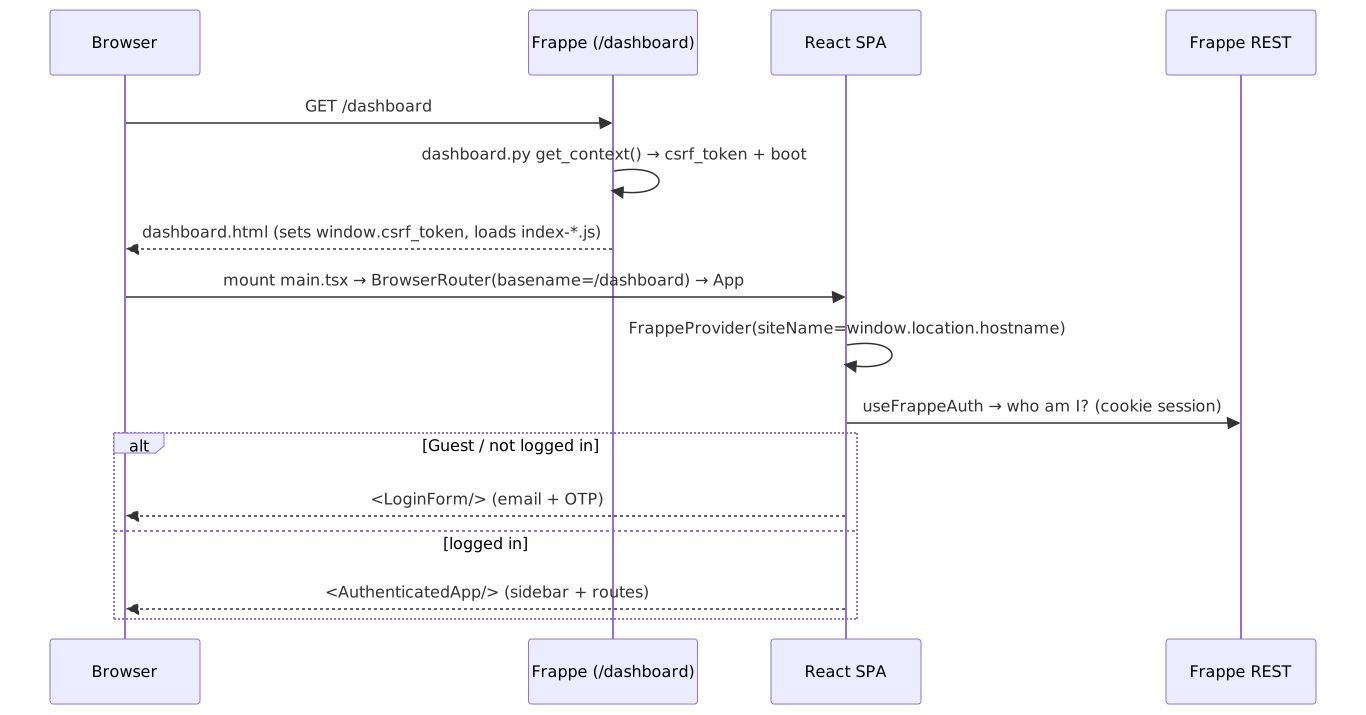
FrappeProvider is given siteName={window.location.hostname} (App.tsx:50) so the SDK knows which site to call. Authentication is cookie-based: Frappe's session cookie is set on OTP verify, and useFrappeAuth reads it. There is no token storage in JS.
3. App shell & routing
Component / routing map

App.tsx — routing + auth gate
AuthGate(App.tsx:30): whileuseFrappeAuth().isLoading→ centered spinner. If!currentUser || currentUser === "Guest"→<LoginForm onSuccess={() => { getUserCookie(); updateCurrentUser() }} />. Otherwise →<AuthenticatedApp/>.AuthenticatedApp(App.tsx:10): nests all routes inside<DashboardLayout/>:- index
/→ "My Boxes" heading +<DevBoxList/>. /billing→<BillingPage/>.*→<Navigate to="/" replace/>(unknown paths bounce home).
- index
<Toaster/>(sonner) is mounted once at the root for all toasts.
DashboardLayout (components/layout/dashboard-layout.tsx)
The persistent chrome around every page:
SidebarProvider+<AppSidebar/>+SidebarInset(the main column).- Header (
h-14, bordered):SidebarTrigger(the collapse/expand button) on the left; on the right, a wallet balance Badge (only ifcustomer.exists) that links to/billing, the current user's email as muted text, and a Logout ghost icon-button (LogOuticon) callinguseFrappeAuth().logout(). <Outlet/>renders the active route in a scrollable area.- A fixed floating Help button (bottom-right circular
CircleHelpFAB) that is amailto:link todevelopers@buildwithhussain.com(dashboard-layout.tsx:71-77). - Subscribes to the
wallet_updatedsocket event and re-fetchesget_customerso the header balance stays live (dashboard-layout.tsx:39).
AppSidebar (components/layout/app-sidebar.tsx)
- Header label "Doppio Box".
- One group "Workspace" with exactly two nav items (
app-sidebar.tsx:16-19):- Dev Boxes →
/(iconBox) - Billing →
/billing(iconWallet)
- Dev Boxes →
- Active item is highlighted by comparing
useLocation().pathnameto the item URL.
Mobile behavior (hooks/use-mobile.ts + sidebar primitive)
useIsMobile()returns true below a 768px breakpoint viamatchMedia(hooks/use-mobile.ts:3).- On mobile the sidebar primitive renders inside a
Sheet(off-canvas drawer, width18rem) toggled byopenMobilestate instead of the inline collapsible rail (components/ui/sidebar.tsx:182). - Keyboard shortcut: Cmd/Ctrl + B toggles the sidebar (
components/ui/sidebar.tsx:31,96-100).
4. The Dev Box experience (the "My Boxes" page)
DevBoxList (components/devbox/devbox-list.tsx) is the heart of the app. It loads the user's boxes, decorates them with trial info, renders the table, and owns every dialog and toast.
(screenshot pending: Dev Box list)
Data loading
useFrappeGetDocList("Dev Box", …)fetchesname, title, status, site_url, code_url, subscription_end_date, is_pool, ordered bymodified desc, up to 100 rows (devbox-list.tsx:38).- A second list query reads
Dev Box Subscriptionfiltered touser = currentUser, is_trial = 1, status not in [Failed](devbox-list.tsx:57). The set ofdev_boxnames from this query is merged onto each row asis_trial_subscription(devbox-list.tsx:67-75) — that boolean drives the "Free Trial" badge and which subscription-action button shows. - Loading → "Loading boxes…"; error → "Failed to load boxes."; empty → an
Emptystate with a "Create Doppio Box" button (devbox-list.tsx:328-345).
The table columns (components/devbox/columns.tsx)
DataTable (components/devbox/data-table.tsx) is a thin TanStack-table wrapper (core row model only, no sorting/pagination/filtering). The columns:
| # | Column | Renders |
|---|---|---|
| 1 | Name | title || name, plus a secondary "Free Trial" badge when is_trial_subscription (columns.tsx:91) |
| 2 | Status | A Badge whose variant maps from status (active→default/green, creating/starting/resetting→secondary, pending/stopped→outline, error/deleted→destructive) (columns.tsx:29-38) |
| 3 | Site | If site_url: an "Open" link (new tab) to the live Frappe site; else — |
| 4 | Code | If code_url: an "Open" link to code-server; else — |
| 5 | Subscription | Human countdown via formatSubscriptionEndDate (columns.tsx:40): No Subscription / Expired (red bold) / N days left / Xh Ym left (3:45 PM) in orange when under 24h |
| 6 | subscription_action | A single context-dependent button (see below) |
| 7 | actions | The "⋯" dropdown menu (see below) |
Column 6 — the subscription-action button (columns.tsx:149-169)
Exactly one of four buttons (or nothing) renders, based on status, whether the subscription is still active (hasActiveSubscription), and whether it is a trial:
| Condition | Button | Icon | Calls |
|---|---|---|---|
| active + active-sub + trial | Upgrade | ArrowUpCircle |
onUpgrade → opens CreateDevBoxDialog in renewal mode |
| stopped + no-active-sub + trial | Choose a Plan | Sparkles |
onChoosePlan → renewal dialog |
| active + active-sub + paid | Extend | RefreshCw |
onExtend → renewal dialog |
| stopped + no-active-sub + paid | Renew | RefreshCw |
onRenew → renewal dialog |
All four handlers in DevBoxList just setRenewDevbox(name), which opens CreateDevBoxDialog with renewForDevBox set (devbox-list.tsx:193-207,361-368).
Column 7 — the "⋯" actions dropdown (columns.tsx:170-256)
Trigger is a ghost icon-xs button (MoreHorizontal). Menu items are gated by status; separators are inserted between groups only when both sides exist. Full inventory:
| Menu item | Visible when | Icon | Handler → action |
|---|---|---|---|
| View Stats | status active |
BarChart3 |
onViewStats → opens StatsDialog |
| Download Workspace | status active or stopped |
Download |
onDownloadWorkspace → opens confirm AlertDialog |
| Start | status stopped + active-sub + not trial |
Play |
onStartBox → run_doc_method start_box |
| Stop | status active/creating/starting |
Square |
onStopBox → run_doc_method stop_box |
| Change Name | status ≠ deleted |
Pencil |
onChangeName → opens rename dialog |
| Reset Dev Box (destructive) | not a pool box AND status active/stopped/error |
RotateCcw |
onResetBox → opens ResetDevBoxDialog |
The reset comment in code notes the backend enforces the subscription gate per role (System Managers bypass), so the frontend shows Reset whenever the status is resettable (
columns.tsx:184-188).
Start / Stop — toasts + realtime + polling fallback
handleStartBox / handleStopBox (devbox-list.tsx:93-123) follow the same pattern:
toast.loading("Stopping {name}…"), store the toast id keyed by box slug, and add the slug toactiveToastSlugs.await runDocMethod({ dt:"Dev Box", dn:name, method:"stop_box" }), thenmutate()to refresh the list.- On error:
toast.error(...), drop the toast.
Progress is then reconciled by socket.io events:
devbox_progress{slug, step}→ updates the loading toast text (devbox-list.tsx:125).devbox_status_update{slug, status}→ resolves the toast to success/error andmutate()s (devbox-list.tsx:152).
Because sockets can be missed, a 30s polling fallback runs while any toast is active: it fetches /api/resource/Dev Box/{slug} and, if status is active|stopped|error, resolves the toast (devbox-list.tsx:164-191).
Other DevBoxList dialogs/actions
- Change Name dialog (
devbox-list.tsx:394-414): aDialogwith oneInput(pre-filled with current title), Cancel + Save buttons, Enter-to-submit. Save →run_doc_method change_title {title}thenmutate()+ success toast. - Download Workspace is a two-part flow: the menu item opens a confirm
AlertDialog(devbox-list.tsx:369-382, "We'll prepare a ZIP and email you a link", Cancel / Continue). Continue →benchspace.api.devbox.download_workspace {devbox}, toast "Download queued — you'll receive an email shortly". When ready, theworkspace_download_readysocket event fires a success toast with a "Download" action button thatwindow.opens the file URL (devbox-list.tsx:269-279).
Create Doppio Box button
Top-right of the list (and inside the empty state): Create Doppio Box (Plus icon) → setShowCreateDialog(true) → opens CreateDevBoxDialog with no renewForDevBox (devbox-list.tsx:322-327).
5. CreateDevBoxDialog — the wizard (create and renew)
components/devbox/create-devbox-dialog.tsx is a multi-step stepper used for both first-time creation and renewing/extending/upgrading an existing box (when renewForDevBox is set, isRenewal = true, header switches to "Renew Doppio Box"). Steps are tracked by a Step union (create-devbox-dialog.tsx:50):
template → plan → billing → paymentMethod → review → provisioning
(screenshot pending: Create Dev Box wizard)
A StepIndicator row at the top shows progress (create-devbox-dialog.tsx:522-544). The Template step is hidden if there is only one template; the Billing step is hidden if the user already has a customer record (hasCustomer).
Data the dialog fetches (all whitelisted GETs, only while open)
| Hook | Method | Purpose |
|---|---|---|
get_customer |
benchspace.api.wallet.get_customer |
existing customer/billing/balance |
get_templates |
benchspace.api.billing.get_templates |
environment templates |
get_plan_info |
benchspace.api.billing.get_plan_info |
plans + USD/INR prices |
get_countries |
benchspace.api.billing.get_countries |
country combobox options |
get_trial_info |
benchspace.api.billing.get_trial_info |
trial eligibility + duration (skipped on renewal) |
Step-by-step buttons & API calls
Template (:546-583): grid of selectable cards (auto-selects the default template; auto-advances if only one). Button: Next (disabled until a template is picked) → plan.
Plan (:585-645): grid of PlanCards showing USD price (big), INR price, per-month breakdown, and a "Save X%" badge for multi-month plans (PlanCard, :1016). If trialInfo.eligible and not a renewal, a dashed free-trial box appears with an optional name Input and a Start Free Trial button → benchspace.api.billing.start_free_trial {devbox_template} → jumps straight to provisioning (:330-343). Footer: Back (only if template step exists) + Next → paymentMethod (existing customer) or billing (new customer) (:345-348).
Billing (:647-711, new customers only): Combobox Country* , Input Billing Name*, Textarea Billing Address*, Input Tax ID (optional). Back → plan, Next → paymentMethod (disabled until country+name+address filled, billingValid, :327).
Payment Method (:713-780): up to two big choice buttons —
- Wallet (only if
hasCustomer): shows balance; disabled if balance < amount. Click →handlePayWithWallet→initiate_devbox_order {payment_method:"wallet", …}→ goes toprovisioningandrefetchCustomer()(:381-407). - Card / UPI: click →
initiateRazorpayOrder→initiate_devbox_order {payment_method:"razorpay", …}→ setsorderData, goes toreview(:355-379). - If wallet is short, a "Top up {amount} to use wallet" link opens the
TopUpDialog(:764-772). - Footer: Back → plan (existing customer) or billing.
Review (Razorpay only, :782-854): optional DevBox Name Input, a summary card (template/plan/duration/billing/amount), an Edit billing details link (existing customers → opens a Sheet, :921), and the big Pay {amount} button → handlePayNow:
- loads the Razorpay script (
lib/razorpay.ts), opens Razorpay Checkout withkey_id/order_idfrom the order. - On success handler: calls
handle_devbox_renewal(renewal) orhandle_devbox_payment(new) with the razorpay ids +subscription_name, then sets the returned slug and goes toprovisioning(:427-447). - During review the dialog cannot be closed (
canClose = step !== "review",:495,showCloseButton/guardedonOpenChange).
Provisioning (:856-910): three states —
- In progress: spinner + live
provisioningSteptext fed by thedevbox_progresssocket event (:245). - Active: green check, "Your Doppio Box is ready!", and Open Site / Open Code external links (URLs fetched via raw
fetchonce status flips active,:298), plus a Done button. Reachingactivealso callsonCreated()whichmutate()s the parent list. - Error: red X, "Provisioning failed… payment was successful, contact support", Close button.
- Same 30s
fetchpolling fallback for status as the list (:273-295). If the user typed a name, it is pushed after creation via rawrun_doc_method change_title(:481-492).
Edit-billing Sheet (:921-966): right-side Sheet with Billing Name / Address / Tax ID (country & currency locked). Save → benchspace.api.wallet.update_customer_billing then refetchCustomer().
Create-a-box sequence
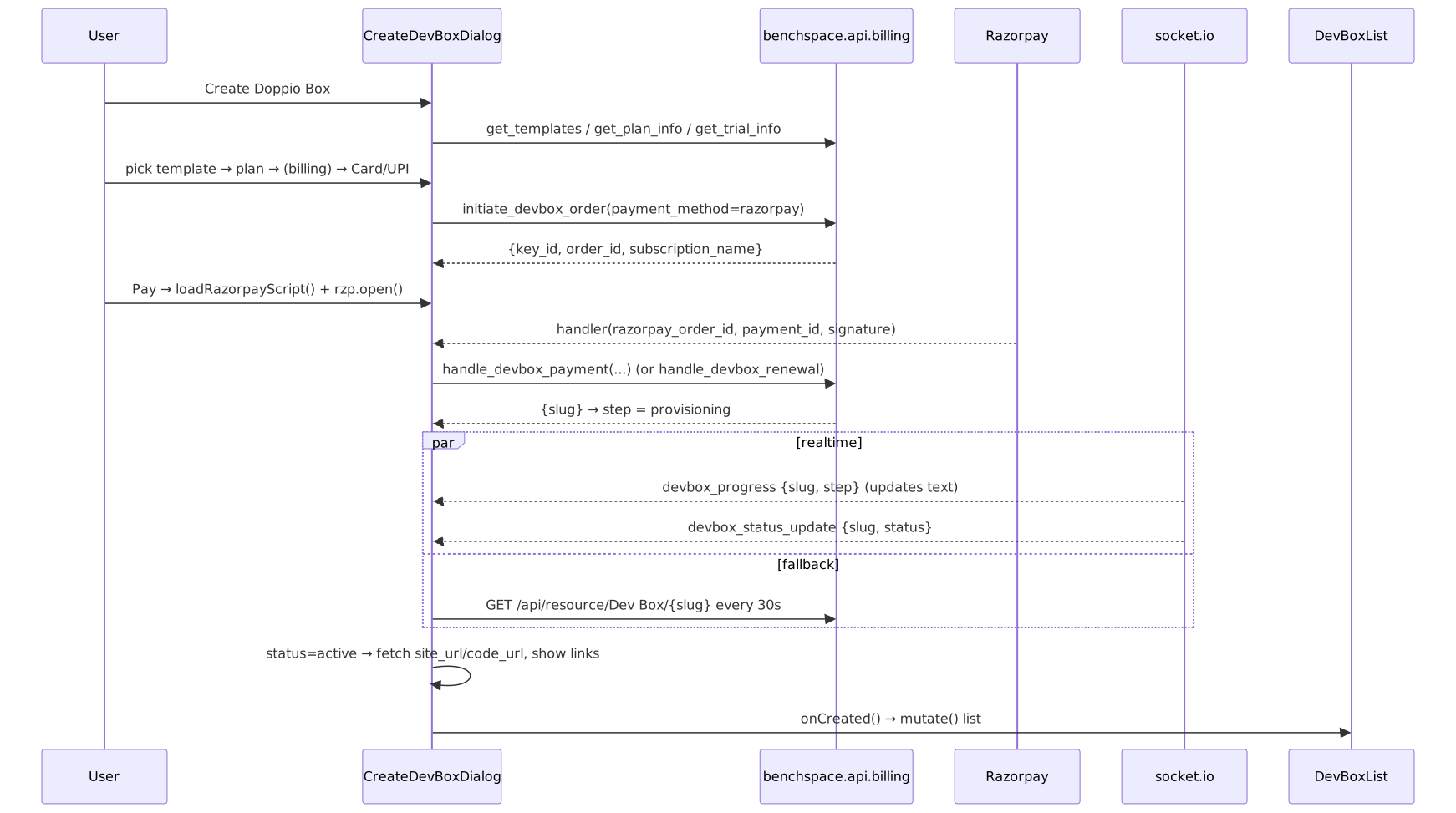
Wallet path is the same minus Razorpay: initiate_devbox_order(payment_method=wallet) returns the slug directly and jumps to provisioning.
6. ResetDevBoxDialog (components/devbox/reset-devbox-dialog.tsx)
(screenshot pending: Reset Dev Box dialog)
A destructive type-to-confirm dialog. Body warns reset wipes files, packages, Frappe data, SSH keys, git config, editor extensions — but keeps URL, name, and subscription.
- If the box is downloadable (
active/stopped), an "Optionally, download workspace first" link (Downloadicon) triggers the same download flow (reset-devbox-dialog.tsx:60-69, wired viaonDownloadWorkspaceindevbox-list.tsx:390). - An
Inputwhere the user must type the exact box label (title || name). The Reset dev box (destructive) button is disabled untilinput.trim() === label; Enter also confirms (:40-46,78,87). - Confirm →
DevBoxList.confirmReset→run_doc_method reset_boxwith the same loading-toast + socket/poll resolution pattern as start/stop (devbox-list.tsx:223-236). - Cancel button closes without action.
7. StatsDialog (components/devbox/stats-dialog.tsx)
(screenshot pending: Stats dialog)
Opened from "View Stats". On open it calls run_doc_method fetch_stats once (no polling — it's a one-shot fetch per open, stats-dialog.tsx:33-50). Shows a spinner, then three StatItems in a grid: CPU (Cpu icon), Memory (MemoryStick), Disk (HardDrive), each a string from {cpu_usage, memory_usage, disk_usage}. On failure: "Failed to fetch stats". No buttons besides the implicit dialog close.
8. Wallet & Billing area
BillingPage (pages/billing-page.tsx) is the /billing route.
(screenshot pending: Billing page)
- Wallet balance card (
billing-page.tsx:56-73): big balance viaformatCurrency, currency sub-label, and a Top up button (size="lg") → opensTopUpDialog. Re-fetches on thewallet_updatedsocket event. - Tabs (
:75-86): Wallet (default) →WalletTransactionsTable; Subscriptions →SubscriptionsTable. - Hosts the shared
TopUpDialogand aCreateDevBoxDialogopened in renewal mode when a subscription row's Renew is clicked (:88-105).
WalletTransactionsTable (components/wallet/wallet-transactions-table.tsx)
Calls benchspace.api.wallet.get_wallet_transactions {limit:100}. Columns: Date, Type (badge: Top-up=default, Plan Purchase=secondary, Refund/Adjustment=outline), Description, Amount (green with + when credit, :96-100), Balance (ending_balance). Empty → "No wallet transactions yet. Top up to get started." No row buttons. See page 08 for the money model.
SubscriptionsTable (components/wallet/subscriptions-table.tsx)
useFrappeGetDocList("Dev Box Subscription", …) (100 rows, newest first). A second list query resolves box titles for the linked dev_box names (subscriptions-table.tsx:85). Columns: Plan, Box (title + mono slug, or slug), Status (badge), Start, End, Method (badge Razorpay/Wallet), Amount (right-aligned formatCurrency), and a trailing Renew button shown only when the row has a dev_box and status is Active or Expired (:140,179-188) → onRenew(dev_box) → opens the renewal CreateDevBoxDialog in the parent. Empty → "You don't have any subscriptions yet."
TopUpDialog (components/wallet/top-up-dialog.tsx)
(screenshot pending: Top-up dialog)
Reused from both BillingPage and inside CreateDevBoxDialog. Two modes:
- First-time (no customer): shows Country*
Combobox(locks wallet currency — India→INR, else USD), Billing Name*, Billing Address*, Tax ID (optional). Country options fromget_countries. - Returning: just the amount section, in the existing wallet currency.
Amount section: preset chip buttons (INR [500,1000,2500,5000] / USD [5,10,25,50]) plus a custom-amount number Input bounded INR 100–50000 / USD 5–1000 (top-up-dialog.tsx:56-59). Footer: Cancel + Pay {amount} (disabled until formValid).
Pay flow (:122-176): benchspace.api.wallet.initiate_topup → loadRazorpayScript() → open Razorpay → on success benchspace.api.wallet.confirm_topup {order_id, payment_id, signature} → success toast + onSuccess() (parent re-fetches balance) + close. Dialog can't be dismissed while loading.
9. Auth UI — LoginForm (components/auth/login-form.tsx)
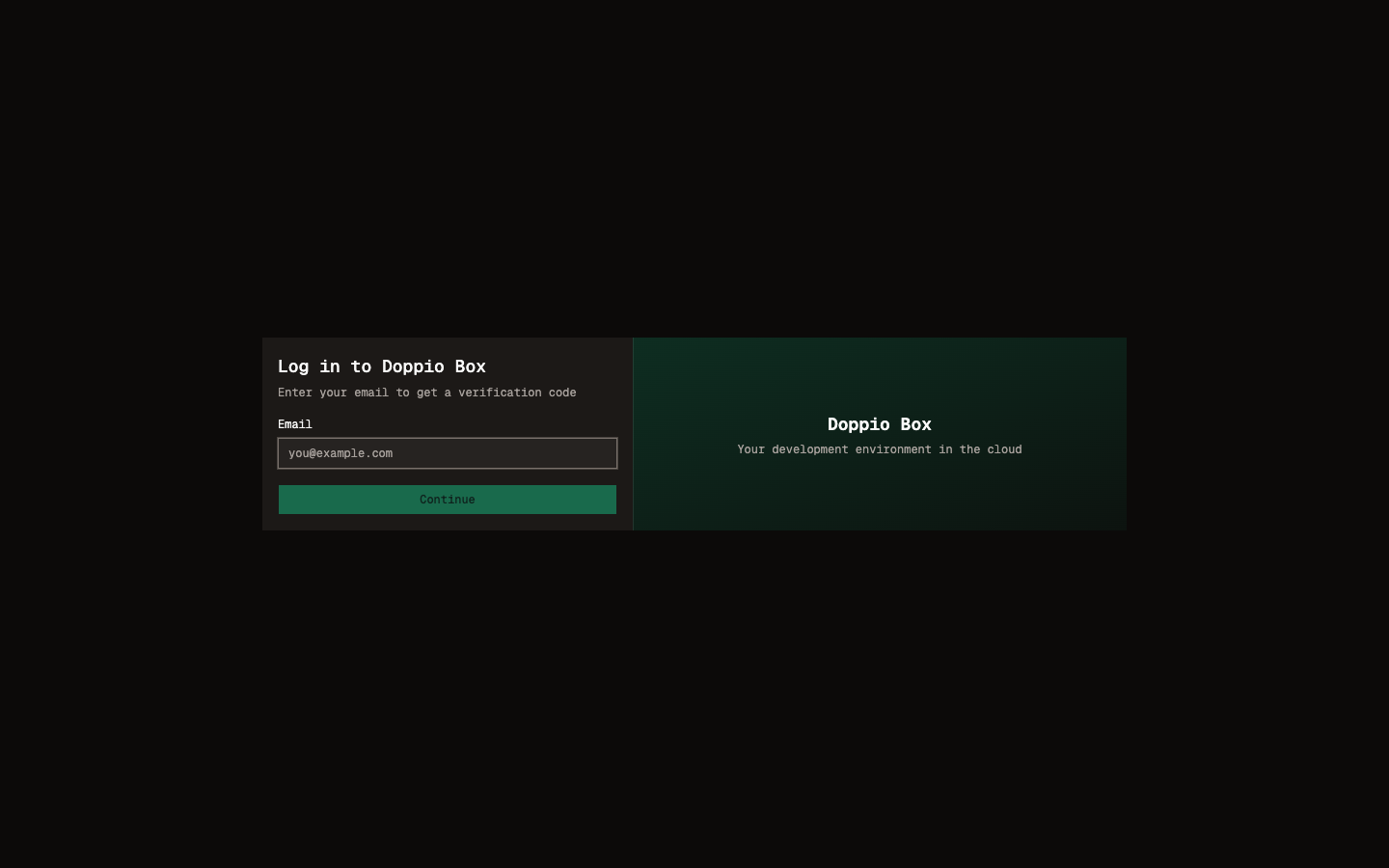 (screenshot pending: Login - OTP step)
Two-step passwordless login (email → 6-digit OTP). Right half is a decorative gradient panel (desktop only). Backend details are in page 09.
- Email step:
Input(type=email, autofocus) + Continue button (disabled while sending or empty) →benchspace.api.auth.send_otp {email}→ advances to OTP step and starts a 30s resend cooldown (login-form.tsx:27-37). - OTP step:
InputOTPwith 6 digit slots (digits only,REGEXP_ONLY_DIGITS), a Change email text button (back to email step), a Verify button (disabled until 6 digits) →benchspace.api.auth.verify_otp_and_login {email, otp}→ on success callsonSuccess()(which the App uses to refresh the session). A Resend code link appears after the cooldown counts down (:50-58,131-145). - Errors render as small destructive text under the form.
10. Complete UI inventory
| Screen / Component | Element | Action | Backend API |
|---|---|---|---|
Landing /devbox |
"Get Started" / "Get Your Doppio Box" / "Dashboard" links | navigate to /dashboard |
— (Jinja page; plans from get_plan_info server-side) |
Landing /devbox |
"Contact Us" / Help links | mailto: enquiry |
— |
| LoginForm (email) | Email input | type email | — |
| LoginForm (email) | Continue | send OTP | benchspace.api.auth.send_otp |
| LoginForm (OTP) | OTP input (6 digits) | enter code | — |
| LoginForm (OTP) | Verify | verify & login | benchspace.api.auth.verify_otp_and_login |
| LoginForm (OTP) | Change email | back to email step | — |
| LoginForm (OTP) | Resend code | resend OTP (after 30s) | benchspace.api.auth.send_otp |
| DashboardLayout header | Sidebar trigger | collapse/expand sidebar (Cmd/Ctrl+B) | — |
| DashboardLayout header | Wallet balance badge | navigate /billing |
(data: wallet.get_customer) |
| DashboardLayout header | Logout icon | end session | useFrappeAuth().logout() |
| DashboardLayout | Help FAB | mailto: support |
— |
| AppSidebar | Dev Boxes | navigate / |
— |
| AppSidebar | Billing | navigate /billing |
— |
| DevBoxList | Create Doppio Box | open create wizard | (loads templates/plans/customer/trial) |
| DevBoxList | (data load) | list boxes / trial subs | GET /api/resource/Dev Box, Dev Box Subscription |
| DevBox row | Site/Code Open links | open site / code-server (new tab) | — |
| DevBox row | Upgrade / Choose a Plan / Extend / Renew | open renewal wizard | (via CreateDevBoxDialog) |
| DevBox row ⋯ | View Stats | open StatsDialog | run_doc_method → Dev Box.fetch_stats |
| DevBox row ⋯ | Download Workspace | confirm → queue ZIP email | benchspace.api.devbox.download_workspace |
| DevBox row ⋯ | Start | start box | run_doc_method → Dev Box.start_box |
| DevBox row ⋯ | Stop | stop box | run_doc_method → Dev Box.stop_box |
| DevBox row ⋯ | Change Name | open rename dialog | (then change_title) |
| DevBox row ⋯ | Reset Dev Box | open reset dialog | (then reset_box) |
| Rename dialog | Name input + Save | rename box | run_doc_method → Dev Box.change_title |
| Download AlertDialog | Continue | queue workspace ZIP | benchspace.api.devbox.download_workspace |
| Workspace-ready toast | Download action | open file url | — (socket workspace_download_ready) |
| ResetDevBoxDialog | type-to-confirm input | enable reset | — |
| ResetDevBoxDialog | "download workspace first" | queue ZIP | benchspace.api.devbox.download_workspace |
| ResetDevBoxDialog | Reset dev box | reset box | run_doc_method → Dev Box.reset_box |
| StatsDialog | (on open) | fetch CPU/mem/disk | run_doc_method → Dev Box.fetch_stats |
| CreateDevBoxDialog (template) | template cards + Next | select env | get_templates |
| CreateDevBoxDialog (plan) | plan cards + Next | select plan | get_plan_info |
| CreateDevBoxDialog (plan) | Start Free Trial | provision trial box | benchspace.api.billing.start_free_trial |
| CreateDevBoxDialog (billing) | country/name/address/tax + Next | capture billing | get_countries |
| CreateDevBoxDialog (pay) | Wallet | charge wallet, provision | benchspace.api.billing.initiate_devbox_order (wallet) |
| CreateDevBoxDialog (pay) | Card / UPI | create razorpay order | benchspace.api.billing.initiate_devbox_order (razorpay) |
| CreateDevBoxDialog (pay) | "Top up to use wallet" | open TopUpDialog | — |
| CreateDevBoxDialog (review) | Pay {amount} | Razorpay checkout + verify | handle_devbox_payment / handle_devbox_renewal |
| CreateDevBoxDialog (review) | Edit billing details | open billing sheet | — |
| CreateDevBoxDialog (sheet) | Save | update billing | benchspace.api.wallet.update_customer_billing |
| CreateDevBoxDialog (provisioning) | Open Site / Open Code | open box urls | GET /api/resource/Dev Box/{slug} |
| CreateDevBoxDialog (provisioning) | Done / Close | close dialog | — |
| BillingPage | Top up | open TopUpDialog | (data: wallet.get_customer) |
| BillingPage | Wallet / Subscriptions tabs | switch view | — |
| WalletTransactionsTable | (data load) | list transactions | benchspace.api.wallet.get_wallet_transactions |
| SubscriptionsTable | (data load) | list subscriptions | GET /api/resource/Dev Box Subscription |
| SubscriptionsTable | Renew | open renewal wizard | (via CreateDevBoxDialog) |
| TopUpDialog | country/billing (first-time) | capture billing | get_countries |
| TopUpDialog | preset chips + custom amount | set amount | — |
| TopUpDialog | Pay {amount} | Razorpay topup + confirm | wallet.initiate_topup → wallet.confirm_topup |
Realtime (socket.io) events consumed
| Event | Payload | Consumer | Effect |
|---|---|---|---|
wallet_updated |
— | DashboardLayout, BillingPage | re-fetch get_customer |
devbox_progress |
{slug, step} |
DevBoxList, CreateDevBoxDialog | update loading toast / step text |
devbox_status_update |
{slug, status} |
DevBoxList, CreateDevBoxDialog | resolve toast / advance provisioning |
workspace_download_ready |
{slug, file_url} |
DevBoxList | toast with Download action |
Screenshot placeholders
The orchestrator should capture real production screenshots for each placeholder below (saved under docs/doppiobox-wiki/screenshots/):
screenshots/devbox-list.png— the "My Boxes" table with at least one box (showing status badge, Site/Code links, subscription countdown, the subscription-action button, and the ⋯ menu, ideally opened).screenshots/create-devbox-wizard.png— the CreateDevBoxDialog, ideally on the Plan step showing plan cards + the free-trial box and the stepper.screenshots/reset-devbox-dialog.png— the ResetDevBoxDialog with the type-to-confirm input and destructive button.screenshots/stats-dialog.png— the StatsDialog showing CPU/Memory/Disk for an active box.screenshots/billing-page.png— the Billing page: wallet balance card + Top up button + the Wallet/Subscriptions tabs.screenshots/top-up-dialog.png— the TopUpDialog showing preset amount chips + custom amount input.screenshots/login-email.png— LoginForm email step (email field + Continue + the right-side gradient panel on desktop).screenshots/login-otp.png— LoginForm OTP step (6-slot OTP input + Verify + resend countdown).