Networking & Caddy Routing
How a request from a user's browser reaches a service running inside a Firecracker microVM, and how each VM gets its own network identity. Covers the host network (bridge + TAP + NAT), MMDS (how a VM learns who it is at boot), and Caddy (the edge proxy that turns
mybox.site.fc-01.doppiobox.cloudinto a connection to a private10.0.0.xVM).
Stale-doc warning:
backbone/agent/architecture.mdstill describes the old Docker + Traefik design. It is wrong. The live system is Firecracker + Caddy. This page is verified against the Go code underbackbone/agent/internal/firecracker/and the rootCLAUDE.md.
1. The big picture
Every Dev Box is a Firecracker microVM with one virtual NIC. That NIC lives on a
private bridge (br-devbox, 10.0.0.0/16) on the host — it is not on the
public internet. So two problems must be solved:
- Inbound: a browser needs to reach the VM's Frappe site / code-server, but the VM has no public IP. → Caddy terminates TLS at the host edge and reverse-proxies into the VM's private IP.
- Outbound: the VM needs to reach the internet (clone from GitHub,
pip install,bench get-app). → iptables MASQUERADE NATs its private IP behind the host's public IP.
And one identity problem:
- Who am I? A VM cloned from a golden snapshot wakes up with the previous VM's identity baked into memory. → MMDS hands the freshly-booted guest its real slug / URLs / env over a link-local metadata endpoint.

2. Host network setup (network.go)
The agent does not use a CNI plugin or a network library — it shells out to the
standard ip and (elsewhere) iptables commands via a tiny run() helper that
captures combined output on failure (network.go:55). Everything below is just
those commands wrapped in Go.
2.1 The bridge — br-devbox (10.0.0.1/16)
The bridge is the host-side Ethernet switch all VMs plug into. It is created
once per host at provisioning time (Ansible / server setup), not per VM, so it
does not appear in network.go. Its identity is fixed in CLAUDE.md:
- Bridge device:
br-devbox, host-side address10.0.0.1/16— this is also the gateway the guests route through. - VM address pool:
10.0.0.0/16, with per-VM IPs allocated and stored in the agent's SQLite DB (/opt/devbox/agent/devbox-agent.db).
Confirmed: network.go contains no bridge-creation code — the br-devbox
device and its 10.0.0.1/16 address are set up host-wide at provisioning time
(Ansible / SERVER_SETUP.md).
2.2 Per-VM TAP device — CreateTAP (network.go:10)
A TAP device is a virtual NIC the host can read/write as if it were a real
network card; Firecracker hands the other end to the guest as its eth0. One
TAP per VM, named tap-{slug}. CreateTAP runs three ip commands in order
(network.go:13-21):
ip tuntap add tap-{slug} mode tap— create the TAP device.ip link set tap-{slug} up— bring it up.ip link set tap-{slug} master br-devbox— attach it to the bridge. This is the wiring step: now any frame the guest sends outeth0lands onbr-devbox, where the host can route/NAT it.
Guest eth0  ─────  tap-mybox  ─────  br-devbox (10.0.0.1)  ─────  host routing/NAT
            (Firecracker)     (master)
Teardown is RemoveTAP (network.go:28): ip link delete tap-{slug}, with errors
swallowed to Debug level — deleting a TAP that never existed (partial-create
cleanup) must not fail the delete path.
2.3 IP allocation & guest config
network.go does not pick the IP — allocation from the 10.0.0.0/16 pool
happens in the db layer and is persisted in SQLite. The lease lives in the
ip_allocations table (ip PK, slug UNIQUE); AllocateIP scans .2–.254
for the next free address and GetIPForSlug does SELECT ip FROM ip_allocations WHERE slug=? (queries.go:155, :222). network.go only consumes the chosen IP:
GuestMAC(ip)(network.go:37) derives a deterministic MAC from the IP octets:06:00:AC:{b2}:{b3}:{b4}. Same IP → same MAC every boot, which keeps the guest's NIC stable across snapshot/restore.BootArgs(ip, gateway, mask)(network.go:48) builds the kernel command line with a static IP (ip=10.0.0.x::10.0.0.1:255.255.0.0::eth0:off) — no DHCP. The gateway is the bridge address10.0.0.1. Note the comment atnetwork.go:43-47: they deliberately leave the clocksource at defaulttsc(chrony fixes drift in userspace) because forcingkvm-clockbreaks Firecracker snapshot/resume — the guest's network goes silent on resume.
2.4 Outbound NAT (iptables MASQUERADE)
VMs have private 10.0.0.x addresses that are not routable on the internet. To let
them reach out (GitHub, package indexes), the host masquerades their traffic
behind its own public IP via an iptables MASQUERADE rule on the POSTROUTING
chain (CLAUDE.md, "Networking"). Return traffic is un-NATed back to the right VM
by the kernel's connection tracking.
The add/remove of per-VM NAT rules is not in
network.goas committed — the file only does TAP + MAC + boot args (noiptablescalls at all). The MASQUERADE rule is a single host-wide rule set up at provisioning; there are no per-VM NAT add/remove functions in the agent.
3. MMDS — how a VM learns who it is (mmds.go)
3.1 What MMDS is
MMDS = Microvm Metadata Service, a Firecracker feature. The VMM (the
Firecracker process on the host) intercepts requests to a link-local address
(169.254.169.254) coming from the guest's NIC and answers them itself — the
traffic never crosses br-devbox or hits the host network stack
(specs/mmds-migration.md:120). It mirrors the AWS EC2 IMDS convention, so the
payload is shaped as latest/meta-data/....
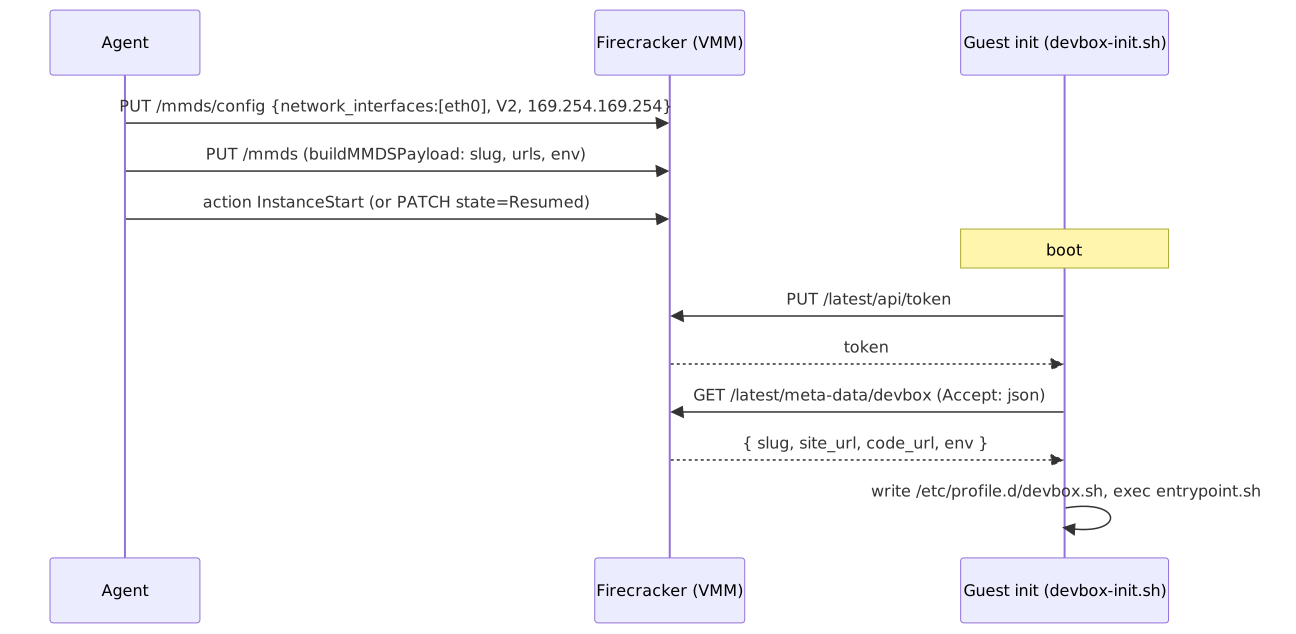
The guest fetches it at boot with the IMDSv2 token dance (mmds.go:9-10,
specs/mmds-migration.md:86):
TOKEN=$(curl -X PUT http://169.254.169.254/latest/api/token \
  -H "X-metadata-token-ttl-seconds: 21600")
curl -H "X-metadata-token: $TOKEN" -H "Accept: application/json" \
  http://169.254.169.254/latest/meta-data/devbox
Accept: application/json returns the subtree as a JSON blob (the default is a
plain-text key listing). Token-less GETs return 401.
3.2 Why it exists — the golden-snapshot problem
New VMs are not cold-booted; they are restored from a golden snapshot in ~3s
(CLAUDE.md, "Golden snapshot"). A snapshot is a frozen copy of one VM's memory +
state — including whatever identity it had when frozen. Restore that into a new Dev
Box and the guest would think it is still the original box: wrong slug, wrong site
URL, wrong env vars.
MMDS is the escape hatch. Because MMDS data lives in the running VMM process, the
agent can set fresh metadata on the paused restored VM (PUT /mmds before
Resumed), so when the guest's init script runs after resume it reads its new
identity, not the baked-in one (specs/mmds-migration.md:109-118). The same reason
applies to plain stop→start: a fresh firecracker process starts with empty MMDS,
so the start path must re-PUT the metadata every boot (specs/mmds-migration.md:268).
MMDS was added to supersede the old, flakier path: SSH into the booted VM and
write /etc/profile.d/devbox.sh. That path blocked "create" on SSH being up,
caused a code-server restart (brief 502), and couldn't safely carry secrets
(specs/mmds-migration.md:30-35). Note that path was not removed — the agent
still runs injectEnvVars over SSH (see §3.3 caveat), so the two coexist today.
3.3 What metadata is injected — buildMMDSPayload (mmds.go:11)
buildMMDSPayload(slug, domain, envVars) marshals exactly this envelope
(mmds.go:15-26):
{
  "latest": {
    "meta-data": {
      "devbox": {
        "slug":     "mybox",
        "site_url": "https://mybox.site.fc-01.doppiobox.cloud",
        "code_url": "https://mybox.code.fc-01.doppiobox.cloud",
        "env":      { "FOO": "bar" }
      }
    }
  }
}
| Key | Value | Purpose |
|---|---|---|
slug |
the box slug | guest knows its own name |
site_url |
https://{slug}.site.{domain} |
exported as DEVBOX_SITE_URL |
code_url |
https://{slug}.code.{domain} |
exported as DEVBOX_CODE_URL |
env |
arbitrary map (defaults to {}) |
per-VM env vars from the create request |
The guest's devbox-init.sh parses this with jq and writes
/etc/profile.d/devbox.sh before entrypoint.sh runs — so code-server starts
once, already holding the env, with no restart churn
(specs/mmds-migration.md:83-107).
Note:
mmds.goonly builds the payload string. The twoapiPUTcalls (/mmds/config,/mmds) against the raw Firecracker socket live infirecracker.goandgolden.go. Confirmed shipped despite the spec header still reading "Draft, not yet implemented":/mmds/config+/mmdsare PUT increateColdBoot(firecracker.go:199-200) andStart(firecracker.go:283-284), baked into the golden snapshot inBuildGoldenSnapshotForTemplate(golden.go:157-158), and re-PUT per-box on restore inCreateFromGoldenTemplate(golden.go:377). The guest consumes it via the IMDSv2 token dance infc-init/devbox-init.sh. Caveat: the spec's other goal — removing the SSH-after-boot path — has not happened;injectEnvVarsstill SSHes in to write/etc/profile.d/devbox.shand restart code-server (golden.go:414,firecracker.go:221), so MMDS and SSH injection currently coexist.
4. Caddy — the edge reverse proxy (caddy.go)
4.1 Where Caddy runs
Caddy runs on the host (one instance per server), in JSON mode (no
Caddyfile). Config lives at /etc/caddy/caddy.json and is driven entirely through
its admin REST API at http://localhost:2019 (CLAUDE.md, "Caddy"). The agent
never restarts Caddy or edits files — it POSTs/DELETEs route objects, which apply
with zero-downtime and immediate HTTP feedback. This is exactly why Caddy replaced
Traefik's fragile "write a YAML file and hope it's noticed" model
(plans/caddy-migration.md:9-18).
NewCaddyClient (caddy.go:21) defaults its base URL to http://localhost:2019
and uses a plain net/http client with a 10s timeout — no extra dependencies.
4.2 TLS — wildcard + on-demand (ConfigureTLS, caddy.go:158)
Certs are provisioned automatically; the agent never ships certs around. There are
two layers (caddy.go:167-206):
- Wildcard certs via DNS-01 (Cloudflare):
*.site.{domain}and*.code.{domain}are issued through an ACME DNS-01 challenge using a Cloudflare API token. One cert covers every box — this avoids hitting Let's Encrypt's per-name rate limits when many boxes spin up. - On-demand TLS fallback: for anything not covered by the wildcards, Caddy
provisions a cert on the first request to a new subdomain. To stop attackers
minting certs for random hostnames, Caddy first asks the agent's
http://localhost:8090/healthendpoint for permission (on_demand.permission,caddy.go:200-205).
If no Cloudflare token is configured, ConfigureTLS logs a warning and skips
wildcard setup (caddy.go:159-162). TLS config is applied with a single PATCH /config/apps/tls (caddy.go:214).
4.3 Adding routes for a box — AddRoute (caddy.go:71)
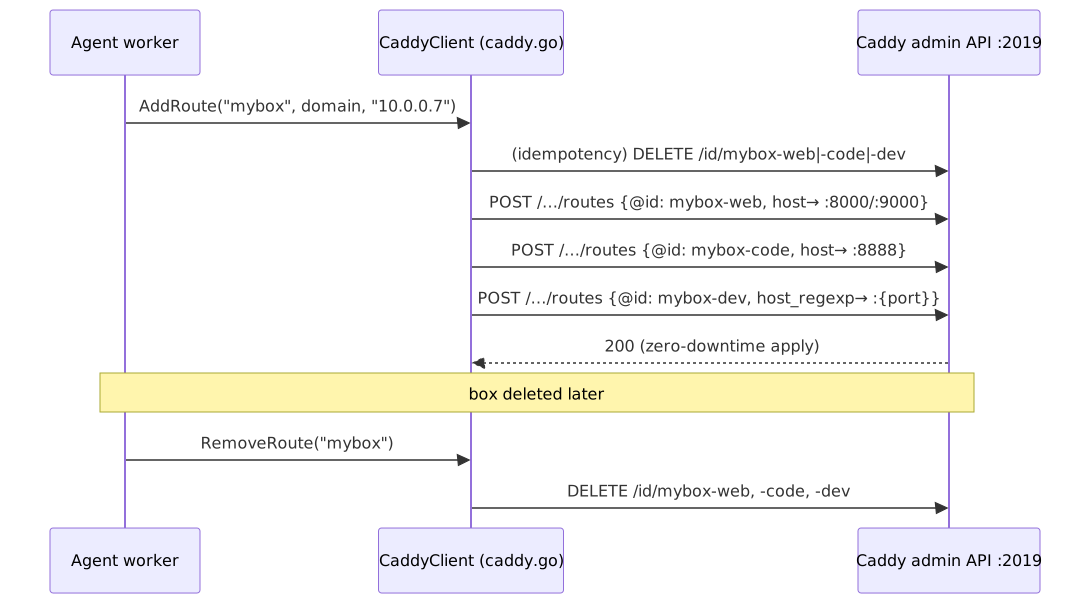
When a box is created/started, the agent calls AddRoute(slug, domain, vmIP),
which builds three route objects and POSTs each to
/config/apps/http/servers/srv0/routes (postRoute, caddy.go:246). Each route
carries an @id ({slug}-web, {slug}-code, {slug}-dev) so it can be deleted in
O(1) by ID later, no searching (caddy.go:33, plans/caddy-migration.md:80).
A Caddy route object is just match → handle: match on the request's Host (or a
header regex), then hand off to a reverse_proxy handler pointed at the VM's
private IP:port.
Route 1 — web/Frappe ({slug}-web, caddy.go:81): matches host
{slug}.site.{domain}, then a subroute splits by path:
/socket.io/*→ setsX-Frappe-Site-Name/Host/Originheaders, thenreverse_proxyto{vmIP}:9000(Frappe's socket.io server) (caddy.go:88-96).- everything else →
encode gzipthenreverse_proxyto{vmIP}:8000(Frappe web) (caddy.go:98-102).
Route 2 — code-server ({slug}-code, caddy.go:107): matches host
{slug}.code.{domain}, encode gzip, reverse_proxy to {vmIP}:8888.
Note: the code-server upstream is
:8888(caddy.go:115).CLAUDE.md's "URL patterns" section and the legacy Docker backend (docker.go, Traefik labelloadbalancer.server.port = 8080) say:8080— that was the Docker-era port. The committed Firecracker code uses:8888, which is authoritative for the Caddy proxy target.
Route 3 — dynamic dev ports ({slug}-dev, caddy.go:120): see below.
After building the list, AddRoute first calls RemoveRoute(slug) to make the
operation idempotent — re-adding on VM restart would otherwise fail with
"duplicate ID", and the error path would then delete the live routes
(caddy.go:140-143). If any POST fails, it rolls back by removing all of the slug's
routes (caddy.go:145-150).
4.4 Removing routes — RemoveRoute (caddy.go:237)
Loops the three suffixes (-web, -code, -dev) and DELETEs each by ID at
/id/{id} (deleteByID, caddy.go:272). A 404 is treated as success — the route
may already be gone from a partial cleanup (caddy.go:286).
5. The URL pattern system
Domain is per-server (e.g. fc-01.doppiobox.cloud). All four patterns resolve to
the same host IP via wildcard DNS; Caddy then routes by Host.
| URL pattern | Matched by | Proxied to | Serves |
|---|---|---|---|
{slug}.site.{domain} |
host match (caddy.go:83) |
{vmIP}:8000 |
Frappe web (gzip) |
{slug}.site.{domain} + path /socket.io/* |
path subroute (caddy.go:88) |
{vmIP}:9000 |
Frappe socket.io (realtime) |
{slug}.code.{domain} |
host match (caddy.go:109) |
{vmIP}:8888 |
code-server (VS Code in browser) |
{port}-{slug}.code.{domain} |
host regexp (caddy.go:122) |
{vmIP}:{port} |
arbitrary dev server (yarn dev, Vite, …) |
5.1 How the dynamic dev-port routing works
A developer running yarn dev inside the VM starts a server on some port (8081,
5173, …) that can't be known in advance. Pre-registering a route per port doesn't
scale. Instead, one route per box handles all ports using Caddy's host-regexp
matcher (caddy.go:78, caddy.go:122-136):
- Pattern:
^(\d+)-{slug}\.code\.{domain}$(slug + domainregexp.QuoteMeta-escaped atcaddy.go:76-77). The leading(\d+)is a capture group namedp. - The
reverse_proxyupstream dials{vmIP}:{http.regexp.p.1}(caddy.go:133) — Caddy substitutes capture group 1 (the port from the subdomain) into the dial address at request time. - So
8081-mybox.code.fc-01.doppiobox.cloud→10.0.0.x:8081, withHostrewritten tolocalhostso the dev tool thinks it's at root/(no path-rewriting / broken asset paths, and Vite HMR WebSocket just works) (plans/caddy-migration.md:90-93).
The plan doc used a separate
*.fc.dev.{domain}zone; the shipped code folds dev ports under*.code.{domain}(caddy.go:78, regex^(\d+)-{slug}\.code\.{domain}$). Trust the code. A wildcard*.code.{domain}DNS record therefore covers both code-server and every dev port.
6. End-to-end request path
Putting it together, a request to open a box's site:
- Browser → DNS.
mybox.site.fc-01.doppiobox.cloudresolves via the wildcard*.site.{domain}record to the host's public IP. - → Caddy (:443). Caddy terminates TLS (wildcard cert, or on-demand). It
matches the
Hostheader against routemybox-web. - → reverse_proxy. Caddy dials the upstream
10.0.0.x:8000(or:9000for/socket.io/*). This is a connection on the host into thebr-devboxsubnet. - → bridge → TAP. The packet goes out
br-devbox, acrosstap-mybox, into the guest'seth0. - → VM service. Frappe (
:8000) or socket.io (:9000) or code-server (:8888) answers; the response retraces the path back out through Caddy to the browser.
Outbound from the VM (e.g. git clone) takes the reverse: guest eth0 →
tap-mybox → br-devbox → host routing → iptables MASQUERADE → public
internet, behind the host's IP.
7. Quick reference
| Thing | Value / location | Source |
|---|---|---|
| Bridge | br-devbox, 10.0.0.1/16 (= gateway) |
CLAUDE.md |
| VM IP pool | 10.0.0.0/16, stored in SQLite |
CLAUDE.md, specs/mmds-migration.md:183 |
| TAP name | tap-{slug} |
network.go:11 |
| Guest MAC | 06:00:AC:{ip octets} (deterministic) |
network.go:40 |
| Outbound | iptables MASQUERADE | CLAUDE.md |
| MMDS endpoint | 169.254.169.254 (link-local, intercepted by VMM) |
mmds.go:9, specs/mmds-migration.md:120 |
| MMDS payload | latest/meta-data/devbox {slug, site_url, code_url, env} |
mmds.go:15 |
| Caddy admin API | http://localhost:2019, JSON mode |
CLAUDE.md, caddy.go:23 |
| Caddy config file | /etc/caddy/caddy.json |
CLAUDE.md |
| Route IDs | {slug}-web, {slug}-code, {slug}-dev |
caddy.go:82,108,121 |
| Web upstream | {vmIP}:8000 (Frappe), :9000 (socket.io) |
caddy.go:95,101 |
| code-server upstream | {vmIP}:8888 |
caddy.go:115 |
| Dev-port upstream | {vmIP}:{regex port} via *.code.{domain} |
caddy.go:133 |