Authentication & GitHub Integration
How a user logs in to Doppio Box, and how they connect a GitHub account so git / gh work inside their dev boxes. Two independent subsystems share this page because both are "identity" concerns: the first proves who you are to the product, the second proves who you are to GitHub.
Part A — Product Authentication (email + OTP)
The auth model in one sentence
There are no passwords. A user proves they own an email address by entering a 6‑digit one‑time code that was emailed to them; on success a normal Frappe session cookie is issued (and the User record is auto‑created on first login).
This is implemented entirely in benchspace/api/auth.py plus a tiny Login Request doctype that holds the pending code.
Login Request doctype
benchspace/bench_space/doctype/login_request/login_request.json
| Field | Type | Notes |
|---|---|---|
email |
Data (Email) | reqd, unique — one row per email (login_request.json:13) |
otp |
Data | the current code; cleared to None after use/expiry |
otp_generated_at |
Datetime | timestamp the code was issued; drives cooldown + expiry |
- Autoname:
hash(random) — the row name is not the email. - Permissions: only System Manager can read/write in Desk; the API mutates it with
ignore_permissions=Truesince guests need it during login. - The controller (
login_request.py) is an emptyDocumentsubclass — all logic lives inauth.py.
There is one Login Request per email, reused across logins (_get_or_create_login_request, auth.py:19). It is not deleted after login; only the otp field is nulled.
Timing constants
auth.py:7-8
| Constant | Value | Meaning |
|---|---|---|
OTP_EXPIRY_SECS |
300 (5 min) |
code is valid for 5 minutes after generation |
COOLDOWN_SECS |
30 |
minimum gap between two send_otp calls for the same email |
OTP generation
_generate_otp (auth.py:11):
- In
developer_mode, the OTP is always111111and is printed to the bench console (and no email is sent). Useful for local dev; a security hole ifdeveloper_modewere ever true in production. - Otherwise:
os.urandom(5)→ a cryptographically random 6‑digit number in100000–999999(int.from_bytes(os.urandom(5), "big") % 900000 + 100000).
Whitelisted methods in auth.py
| Method | Params | Returns | Guest allowed? | Purpose |
|---|---|---|---|---|
send_otp |
email |
{"message": "OTP sent"} |
Yes (@frappe.whitelist(allow_guest=True), auth.py:30) |
Validate email, enforce 30s cooldown, generate + email the code |
verify_otp_and_login |
email, otp |
{"message": "Login successful"} |
Yes (auth.py:63) |
Validate code, auto‑create user, create session |
Two non‑whitelisted hooks also live here:
| Function | Trigger | Purpose |
|---|---|---|
assign_dev_box_role(doc, method) |
User doc event (hooked elsewhere) |
Adds the Dev Box User role to every new non‑system user (auth.py:113) |
There is no custom logout method in
auth.py— logout relies on Frappe's built‑in/api/method/logout/frappe.local.login_manager.logout(). This app does not add one.
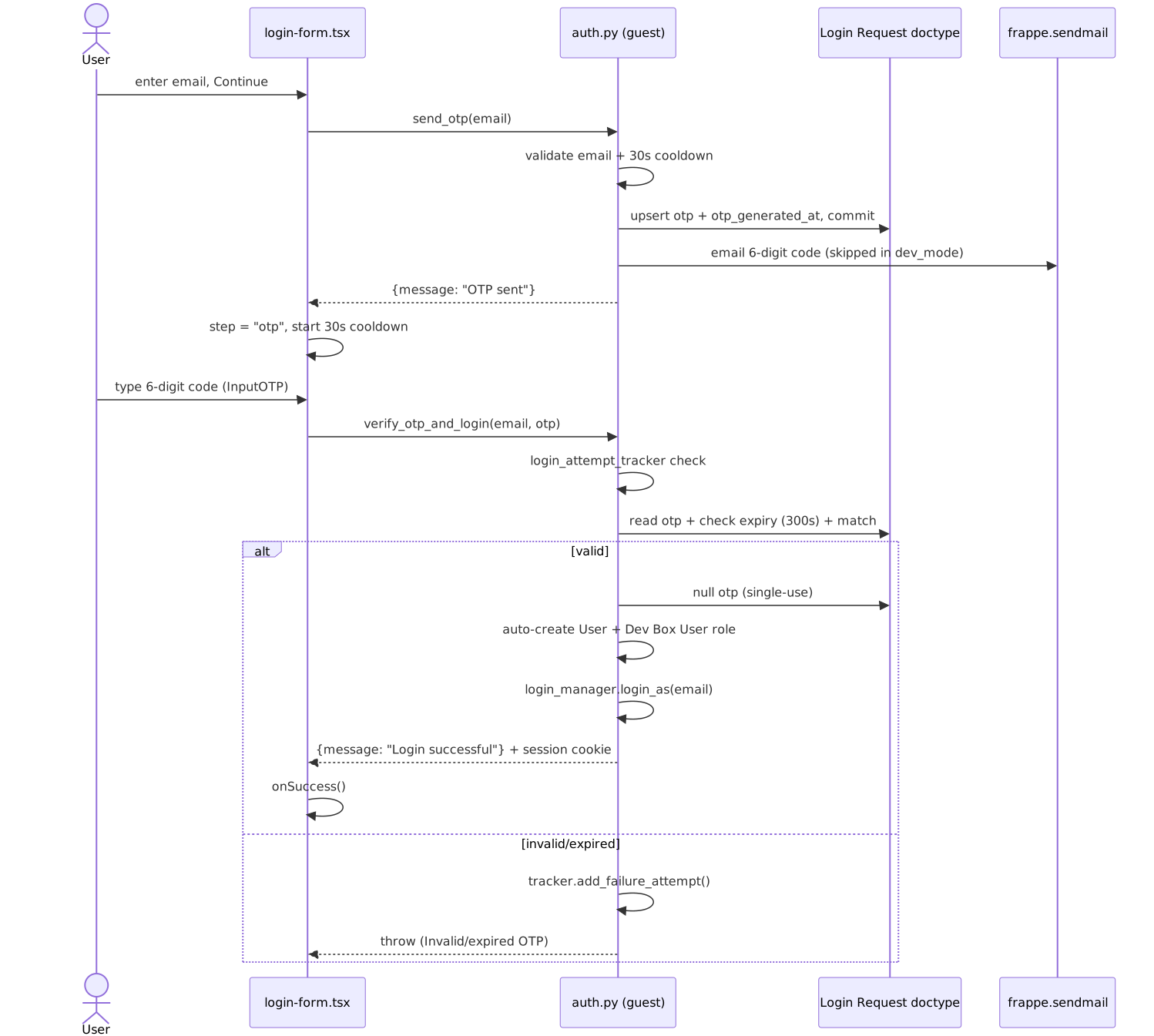
send_otp step by step (auth.py:31)
- Normalise:
email.strip().lower(). - Validate against
EMAIL_RE(auth.py:6); throw"Invalid email address"on failure. - Get-or-create the
Login Requestrow. - Cooldown: if
otp_generated_atexists and less than 30s have elapsed, throw"Please wait N seconds…"(auth.py:39). - Generate the OTP, store it +
otp_generated_at,save(ignore_permissions=True), commit. - If not
developer_mode,frappe.sendmailwith theotpemail template,now=True(sent synchronously so the user isn't left waiting on a worker).
verify_otp_and_login step by step (auth.py:64)
- Normalise email.
- Brute‑force tracker:
frappe.auth.get_login_attempt_tracker(email)— Frappe's built‑in per‑identifier lockout. Every wrong/missing/expired code callstracker.add_failure_attempt(); success callsadd_success_attempt(). This is the real rate‑limit on guessing. The lockout thresholds come from Frappe's System Settings (allow_consecutive_login_attempts/allow_login_after_fail), not from this app. - Look up
otp+otp_generated_at. If row missing orotpis null → fail attempt, throw"OTP expired or not found…". - Expiry: if elapsed > 300s → null the
otp, fail attempt, throw"OTP has expired…". - Match:
login_request.otp != str(otp).strip()→ fail attempt, throw"Invalid OTP". - On success: null the
otpimmediately (single‑use), record success attempt. - Auto‑provision: if no
Userexists for this email, create one (first_name= local part,send_welcome_email=0) and add theDev Box Userrole (auth.py:95). - Commit, then
frappe.local.login_manager.login_as(email)— this is what mints the Frappe session cookie (sid). The browser is now authenticated for all subsequent/api/method/...calls.
Security properties to note:
- Single‑use (otp nulled on success) and short‑lived (5 min).
- Cooldown (30s) throttles email sending; the login‑attempt tracker throttles guessing.
- Codes are random and 6 digits → 1‑in‑900k per guess, gated by the tracker lockout.
- Weak spot:
developer_modeforces111111and skips the email — never enable it in prod.
The dashboard side (login-form.tsx)
dashboard/src/components/auth/login-form.tsx is a two‑step React form using frappe-react-sdk's useFrappePostCall:
- Step
email(login-form.tsx:73): an<Input type="email">; submitting callssend_otp, then switches to stepotpand starts a 30s client cooldown mirroring the server'sCOOLDOWN_SECS. - Step
otp(login-form.tsx:94): the OTP UI is shadcn'sInputOTP(components/ui/input-otp.tsx) — sixInputOTPSlots in two groups of three split by anInputOTPSeparator(a minus icon),maxLength={6},pattern={REGEXP_ONLY_DIGITS}so only digits are accepted. The Verify button is disabled untilotp.length === 6. Each slot is an 8px box that renders one char with a blinking fake caret on the active slot. - Submitting calls
verify_otp_and_login; on success the form firesonSuccess()(the app then reloads into the authenticated dashboard). "Resend code" re‑callssend_otpand is disabled during the cooldown; "Change email" returns to step 1.
The session cookie set by login_as on the server is what authenticates every later API call — the dashboard never handles an API key.
Diagram (a) — email‑OTP login
Part B — GitHub Integration
Why it exists
Inside a dev box a developer wants git push, git clone of private repos, and gh CLI to "just work" without pasting a personal access token. And the platform wants to build template images that install Frappe apps from private GitHub repos. Both need a GitHub credential tied to the user.
The integration uses a GitHub App (not a plain OAuth app) created once by an admin via GitHub's manifest flow. Each user then OAuth‑authorizes that app; their user‑to‑server token is stored and later injected into their boxes as GITHUB_TOKEN.
The original design + verification log lives in plans/github-integration.md (four tracer bullets, all marked done).
One‑time admin setup — the manifest redirect
benchspace/www/github/redirect.py
When Bench Space Settings.github_app_id is empty, GitHub redirects the admin here after they create the App from a manifest. The page POSTs the one‑time code to https://api.github.com/app-manifests/{code}/conversions and saves the returned id, client_id, client_secret, html_url into Bench Space Settings (redirect.py:18-23), then redirects to the settings form. The empty redirect.html exists only because Frappe requires a template for a www page.
App credentials stored on the singleton:
| Setting field | Use |
|---|---|
github_app_id |
presence = "app configured" |
github_app_client_id |
used to build the authorize URL + token exchange |
github_app_client_secret |
Password field; used in token exchange + revocation |
github_app_public_link |
base for the /installations/new install link |
GitHub Token doctype
benchspace/bench_space/doctype/github_token/github_token.json
| Field | Type | Notes |
|---|---|---|
user |
Link → User | autoname field:user → one token row per user, named by email |
access_token |
Password | GitHub user token, AES‑encrypted at rest by Frappe |
github_username |
Data (read‑only) | login fetched from /user |
authorized_at |
Datetime (read‑only) | when the connect happened |
Permissions: System Manager full; everyone else gets if_owner read only (github_token.json:63). Crucially, the access_token is a Password fieldtype, so it is never sent to the browser even on an owner read — you must call get_password() server‑side to decrypt it. Controller (github_token.py) is an empty Document.
The OAuth connect flow — endpoints
API module benchspace/api/github.py (all @frappe.whitelist(), session‑required, not guest):
| Endpoint | Params | Returns | Purpose |
|---|---|---|---|
status |
— | {app_configured, connected, github_username, authorized_at} |
UI state; never returns the token (github.py:9) |
get_connect_url |
— | authorize URL (string) | Builds the GitHub authorize URL with base64 state (github.py:32) |
disconnect |
— | {"success": True} |
Revokes the token on GitHub + deletes the row (github.py:49) |
repos |
— | list of repos with push access |
Lists private repos via the user token (github.py:79) |
And the callback page benchspace/www/github/:
| Page | File | Purpose |
|---|---|---|
/github/authorize |
authorize.py |
OAuth callback — exchanges code for token, stores it |
/github/connect |
connect.py + connect.html |
The user‑facing connect/disconnect/repos page |
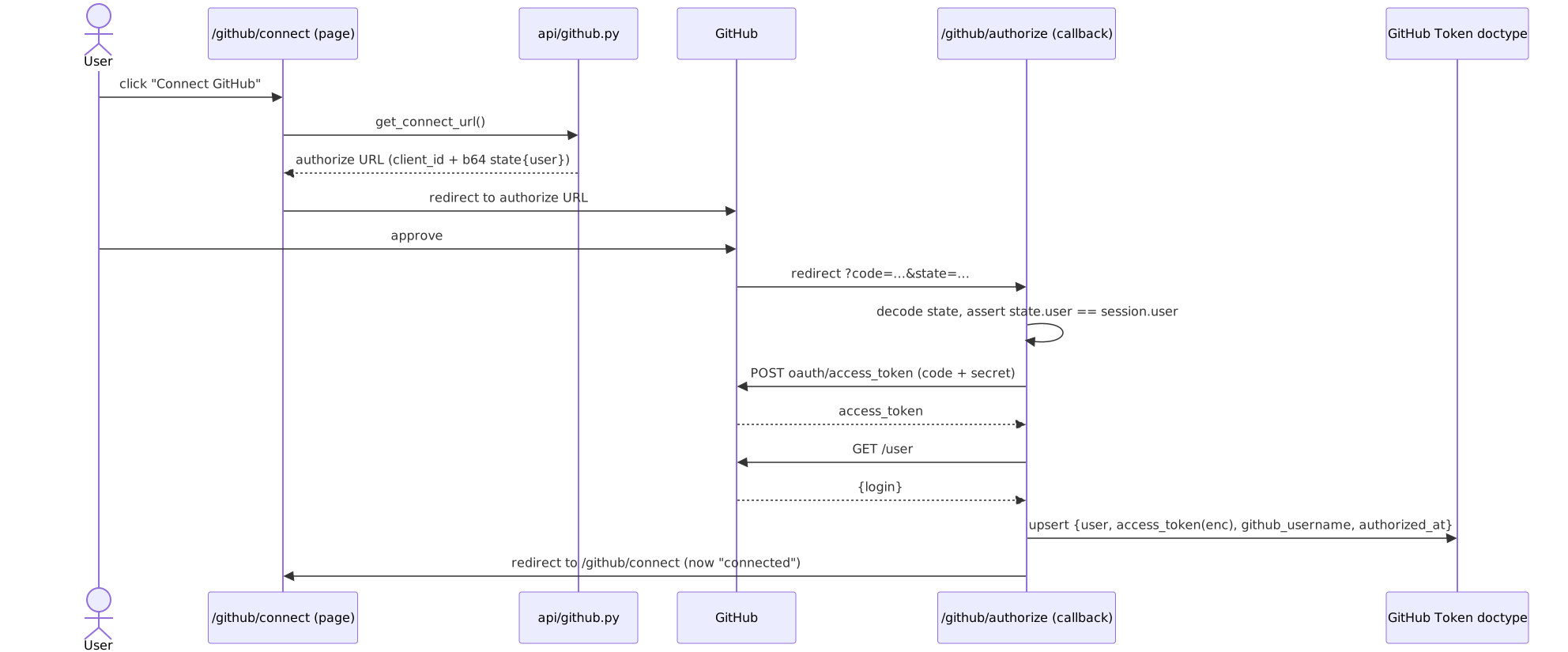
get_connect_url (github.py:32)
Throws if github_app_client_id is unset. Builds state = b64encode(json({"user": session.user})) and returns
https://github.com/login/oauth/authorize?client_id=…&state=…. The state is the CSRF guard — it binds the round‑trip to the Frappe user who initiated it.
/github/authorize — the callback (authorize.py:10)
- If
codeorstateis missing → it was the App‑installation redirect (which sendssetup_action), so just bounce to/github/connect(authorize.py:15). - Decode
state; verifystate_data["user"] == frappe.session.user→ mismatch throws (authorize.py:25). This stops a token from being attached to the wrong account. - Exchange
codeathttps://github.com/login/oauth/access_tokenusingclient_id+ decryptedclient_secret; readaccess_tokenfrom the JSON. - Fetch
https://api.github.com/userwith the token →login(GitHub username). - Upsert the
GitHub Tokenrow forsession.userwith token + username +now_datetime(),save(ignore_permissions=True), commit. - Redirect to
/github/connect.
/github/connect (connect.py + connect.html)
Server context sets app_configured, connected, github_username, authorized_at, and an install URL ({github_app_public_link}/installations/new). The template shows one of three states: not‑configured (admin warning), connected (username + Disconnect + repo list), or a "Connect GitHub" button. Its inline JS uses frappe.call to hit get_connect_url (then window.location to GitHub), disconnect, and repos. The repo list is filtered client‑side to repos with permissions.push and is XSS‑sanitised before injection (connect.html:107).
disconnect (github.py:49)
Decrypts the token, calls DELETE https://api.github.com/applications/{client_id}/token (Basic auth = client_id:client_secret) to revoke it on GitHub, logs but swallows network errors, then frappe.delete_doc("GitHub Token", session.user).
repos (github.py:79)
Pages through GET /user/repos (per_page=100, visibility=private, sorted by pushed) using the decrypted token, returning full_name, private, description, html_url, pushed_at, and permissions.push.
Diagram (b) — GitHub OAuth connect
Part C — App Source → installable apps in a template
A GitHub Token authenticates a person's boxes. An App Source is a reusable catalogue entry pointing at a Frappe app repo that template images can install.
App Source doctype
benchspace/bench_space/doctype/app_source/app_source.json
| Field | Type | Notes |
|---|---|---|
title |
Data | autoname field:title, unique |
app_name |
Data | the Frappe app directory name (e.g. erpnext, lms) |
repository_url |
Data | git URL to clone |
branch |
Data | branch to check out |
How it feeds a template build
A DevBox Template has a child table of DevBox Template App rows (devbox_template_app.json): each row is a Link → App Source plus an install_on_site checkbox. When the template builds its image, DevBoxTemplate.build_image walks those rows, loads each App Source, and emits an apps_json list of {app_name, url, branch} into the build Agent Job's env (devbox_template.py:104-119). The image build then clones those repos. (Image build / Dockerfile mechanics are owned by page 07 / 03; this page only documents the auth surface.)
How a private
App Sourcerepo gets cloned during the build is the build server's concern. Confirmed:DevBoxTemplate.build_image(devbox_template.py:93-138) puts onlyPYTHON_VERSION,NODE_VERSION,MARIADB_VERSION,FRAPPE_BRANCH, and theAPPSJSON into the build job'senv_vars— it attaches no GitHub Token. Private app-source clones during the build therefore rely on the builder server's own git credentials, not any end-user token. The per‑userGITHUB_TOKENdescribed below is injected into user dev boxes at runtime, not into the shared image build.
Part D — Security boundary: how the token reaches a box
This is the part to get exactly right.
Storage
GitHub Token.access_tokenandBench Space Settings.github_app_client_secretarePasswordfieldtype → Frappe stores them AES‑encrypted (key fromencryption_keyin site config) in the__Authtable, not in the doc's own row.- Reading requires
doc.get_password("access_token", raise_exception=False)server‑side. The token is never serialized to the frontend —status()deliberately returns only username + timestamp (github.py:24).
Injection into a dev box
At box create/reset, DevBox._send_agent_task looks up the owner's GitHub Token, decrypts it, and puts it in env_vars["GITHUB_TOKEN"], then JSON‑encodes that into the Agent Job record (dev_box.py:208-224). The agent picks up the job and sets GITHUB_TOKEN in the container's environment; gh and git inside the box auto‑authenticate.
- The transport from Frappe → agent → container (Agent Job polling, env var threading through the Go agent, MMDS/Firecracker specifics) is documented on page 05. This page's responsibility ends at "the decrypted token is placed in the Agent Job
env_vars." - Token is injected only on
create/reset, never on plainstart(dev_box.py:210).
Scopes & lifecycle caveats (from plans/github-integration.md)
- The GitHub App is installed per‑repo by the user; private repos become visible only after they install it (the connect page links to
/installations/new). Push access is granted via the App'scontents: writepermission. - The token is baked into the container at creation time — stop/start does not refresh it. To rotate, the user must recreate the box. If they
disconnectafter creating a box, the in‑container token goes stale (github-integration.md:128-131). statevalidation (session.user == state.user) is the OAuth CSRF defence; agent traffic is on the internal network with Bearer auth.
Diagram (c) — App Source + token feeding a box

Cross‑references
- Page 05 — Agent Job transport, Firecracker/MMDS, how env vars actually land in the container.
- Page 07 / 03 — DevBox Template + image build, Dockerfile,
apps_json. - Bench Space Settings — singleton holding GitHub App credentials +
builder_server.
Source files
benchspace/api/auth.py,benchspace/api/github.pybenchspace/www/github/{authorize,connect,redirect}.{py,html}benchspace/bench_space/doctype/login_request/,github_token/,app_source/,devbox_template_app/benchspace/bench_space/doctype/dev_box/dev_box.py:208,devbox_template/devbox_template.py:93dashboard/src/components/auth/login-form.tsx,dashboard/src/components/ui/input-otp.tsxplans/github-integration.md