Amazon Min Max Report
Computes per-item Min and Max stock levels for Amazon replenishment, derived purely from recent Sales Order demand and the item's purchase pack size.
Screenshot
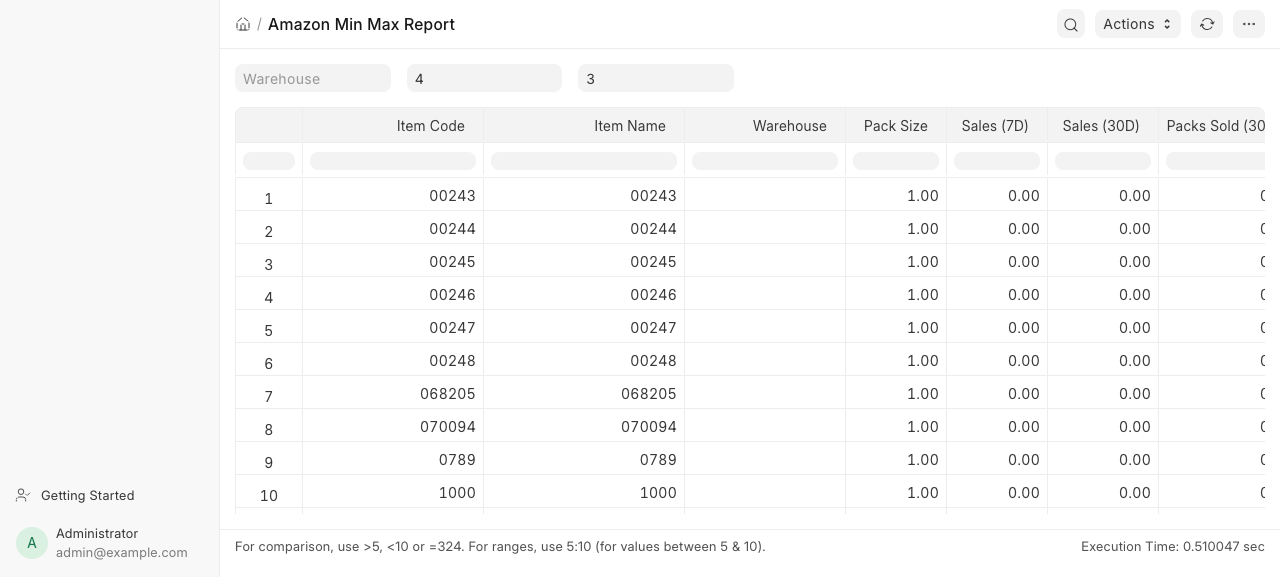
Purpose
- Purchasing / Stock planners use it to set reorder points so fast movers stay in stock and slow movers don't over-stock.
- Turns the last 30 days of Sales Order demand into pack-rounded Min/Max thresholds.
- Tunable per run via Min Cover Days and Max Multiplier filters.
- Feeds the broader restock workflow (compare with the To Purchase report).
How to Access
Desk > Reports > Amazon Min Max Report, or /app/query-report/Amazon Min Max Report.
Report type: Script Report. Reference DocType: Item.
Roles: Stock Manager, Stock User, Purchase Manager, Purchase User, Sales Manager.
Filters
| Filter | Type | Required | Description |
|---|---|---|---|
| Warehouse | Link (Warehouse) | No | Display-only label echoed into the warehouse column. It does not filter the demand calculation (sales are aggregated globally). |
| Min Cover Days | Int | No | Days of cover the Min should hold. Default 4. Drives the preliminary Min: round(packs_sold_per_day * min_cover_days) * pack_size. |
| Max Multiplier | Int | No | Multiplier applied to the preliminary Min to get the Max. Default 3. |
Columns
| Column | Type | Description |
|---|---|---|
| Item Code | Link (Item) | The item (Item.name). Only disabled = 0 and is_stock_item = 1 items are included. |
| Item Name | Data | Item.item_name. |
| Warehouse | Link (Warehouse) | Echo of the Warehouse filter value (blank if not set). |
| Pack Size | Float | Conversion factor of the item's purchase UOM (from UOM Conversion Detail where uom = Item.purchase_uom). Defaults to 1.0 when absent. |
| Sales (7D) | Float | Total Sales Order Item qty in the last 7 days (submitted SOs only). |
| Sales (30D) | Float | Total Sales Order Item qty in the last 30 days (submitted SOs only). |
| Packs Sold (30D) | Float | sales_30d / pack_size. |
| Min Stock Level | Float | Computed Min — ceil(max_val / 2) (or 0 when Max is 0). |
| Max Stock Level | Float | Computed Max — see formula below. |
How It Works
Demand comes from submitted Sales Orders (docstatus = 1) in the trailing 30-day window, summed per item_code. A Case expression splits out the 7-day slice in the same query. Pack size is the purchase-UOM conversion factor; for variant items, the Max is floored to the largest pack size sold across all variants of the same template (variant_of), so a Max never lands below one purchasable pack.
flowchart LR
  SO[Sales Order + Items<br/>docstatus=1, last 30d] --> AGG[Sum qty<br/>7d / 30d per item]
  ITM[Item + UOM Conversion Detail<br/>disabled=0, is_stock_item=1] --> PACK[pack_size = purchase UOM<br/>conversion_factor]
  ITM --> MAXP[max_pack_by_base<br/>Max conversion per variant_of]
  AGG --> CALC[calculate_min_max]
  PACK --> CALC
  MAXP --> CALC
  CALC --> OUT[Min / Max Stock Level<br/>per item row]
Min/Max formula (calculate_min_max):
packs_sold_30 = sales_30d / pack_sizeprelim_min = round((packs_sold_30 / 31) * min_cover_days) * pack_size- Low-volume suppression — if
0 < packs_sold_30 < 5,prelim_min = 0. - No-recent-demand suppression — if
sales_7d == 0,prelim_min = 0. max_val = prelim_min * max_multiplier.- Slow-mover override — if
sales_7d == 0andpacks_sold_30 >= 5, computeoverride_min = round((packs_sold_30 / 31) * 6) * pack_sizeandoverride_max = override_min * 2; if that beatsmax_val, use it (keeps steady-but-quiet items stocked). - Pack floor — if
0 < max_val < max_pack_qty, raisemax_valtomax_pack_qty. min_val = ceil(max_val / 2)(0 whenmax_val == 0).
Note the divisor is 31 (not 30) when converting the 30-day total to a daily rate.
Notes
- The Warehouse filter is cosmetic — demand is aggregated across all warehouses, not scoped to the selected one.
- Items with no sales in the window produce Min = Max = 0.
- Non-variant items use their own pack size as the floor (
max_pack_qtyfalls back topack_size). - No conditional formatting is applied; all values are plain floats.