Amazon Pricing Push Monitor
Tracks the recent history of Amazon pricing feed submissions — both the ones Navgold pushed and feeds Amazon received from other sources — so you can spot stuck, failed, or partially-rejected pushes.
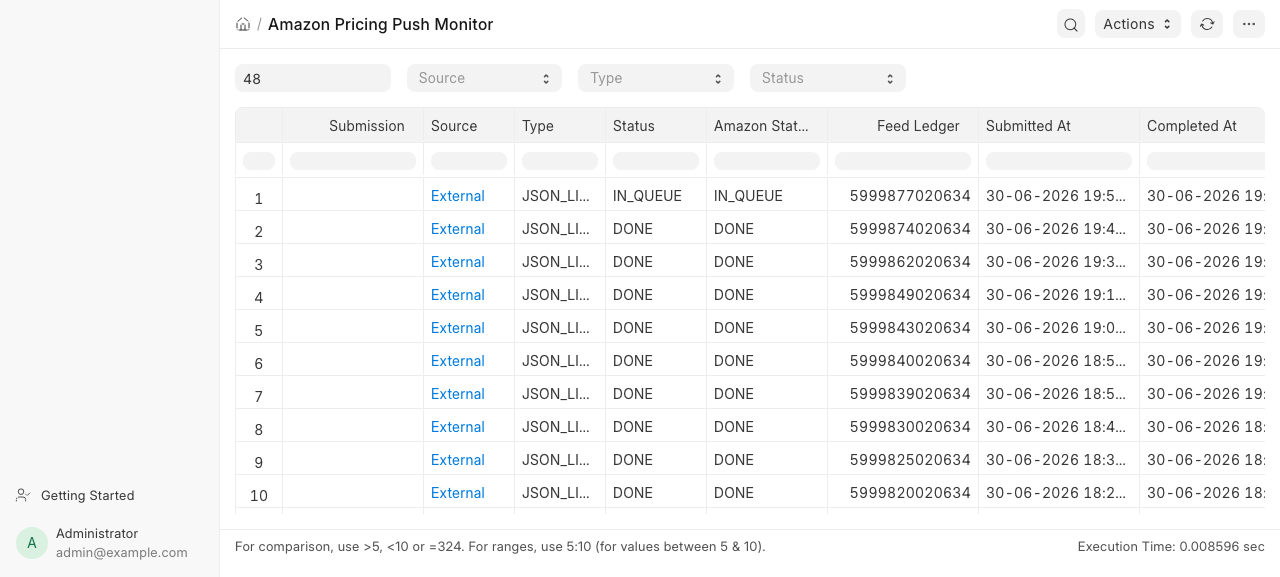
Screenshot
Purpose
- Pricing / ops users watching whether a price push actually landed on Amazon.
- Answers: did my last feed complete, how long has it been pending, and how many records did Amazon reject?
- Surfaces feeds submitted outside Navgold (e.g. Repricer) that Amazon still processed, so nothing slips through unmonitored.
- Flags submissions stuck in
Submittedfor too long and feeds with invalid records.
How to Access
Desk > Reports > Amazon Pricing Push Monitor, or /app/query-report/Amazon Pricing Push Monitor.
Report type: Script Report. Reference DocType: Amazon Pricing Submission Log.
Filters
| Filter | Type | Required | Description |
|---|---|---|---|
| Hours Back | Int | No | Look-back window in hours. Defaults to 48. Rows are filtered by creation (Navgold logs) / created_time (external ledgers) newer than now - hours_back. |
| Source | Select | No | Navgold or External. Blank shows both. External = feeds Amazon received with no matching submission log. |
| Type | Select | No | Amazon or Repricer. Filters Navgold logs by submission_type. When set, external feeds are excluded. |
| Status | Select | No | Pending, Submitted, Completed, Error. Filters Navgold logs by status. When set, external feeds are excluded. |
Columns
| Column | Type | Description |
|---|---|---|
| Submission | Link → Amazon Pricing Submission Log | The submission log name. Blank for External rows (no Navgold log). |
| Source | Data | Navgold (we pushed it) or External (Amazon received it from elsewhere). |
| Type | Data | Navgold: submission_type (Amazon/Repricer). External: the ledger's feed_type. |
| Status | Data | Navgold: log status. External: the ledger's processing_status. |
| Amazon Status | Data | Navgold: amazon_status. External: the ledger's processing_status. |
| Feed Ledger | Link → Amazon Feed Ledger | The matched feed ledger. For Navgold rows, only populated when the feed_id resolved to a ledger. |
| Submitted At | Datetime | Navgold: submitted_at. External: ledger created_time. |
| Completed At | Datetime | Navgold: completed_at. External: ledger processing_end_time. |
| Minutes Pending | Int | For Navgold rows in Submitted status only: (now − submitted_at) in minutes. 0 otherwise. |
| Records | Int | Navgold: count of non-blank lines in pricing_records. External: ledger messages_processed. |
| Accepted | Int | Ledger messages_accepted. |
| Invalid | Int | Ledger messages_invalid. |
| Error | Data | Navgold: first 200 chars of error_message. External: "{n} invalid" when there are invalid records. |
How It Works
The report unions two row sources, then sorts everything by submission time descending (rows with no time fall back to a 1900-01-01 epoch so they sink to the bottom).
flowchart LR
  F[Filters: hours_back, source, type, status] --> N[Navgold logs]
  F --> E[External ledgers]
  N -->|Amazon Pricing Submission Log<br/>creation > cutoff| NL[get_ledger_counts<br/>by feed_id]
  L[Amazon Feed Ledger] --> NL
  E -->|Amazon Feed Ledger<br/>source=External, created_time > cutoff| ER[external rows]
  NL --> M[merge + sort by time desc]
  ER --> M
  M --> OUT[report rows]
- Navgold rows come from
Amazon Pricing Submission Logfiltered bycreation > cutoff(plus optionalsubmission_type/status). Each log'sfeed_idis matched againstAmazon Feed Ledgerto pullmessages_accepted/messages_invalid.Recordsis computed from the log'spricing_recordstext (one record per non-blank line). - External rows come from
Amazon Feed Ledgerwheresource = "External"andcreated_time > cutoff. These are feeds Amazon processed that no Navgold submission log matched (e.g. submitted directly by Repricer). Becausestatusandsubmission_typeare Navgold-only concepts, setting either filter excludes external feeds entirely. Minutes Pendingis only meaningful for Navgold logs still inSubmittedstatus.
Conditional formatting (from the report JS)
- Status =
Error→ text in red (--red-600). - Minutes Pending > 60 → text in orange (
--orange-600). - Source =
External→ text in blue (--blue-600). - Invalid > 0 → text in red (
--red-600).
Notes
- A row stuck in
Submittedwith a risingMinutes Pending(orange past 60) indicates a feed Amazon has not finished processing — a poller/timeout candidate. - External rows never have a
Submissionlink and always reportMinutes Pending = 0. - Related: Amazon Pricing Push Readiness (pre-push gating) and Below Min Price Sales (post-push leak detection).
Last updated 1 month ago
Was this helpful?