Stock Reservation Guard
Stock Reservation Guard
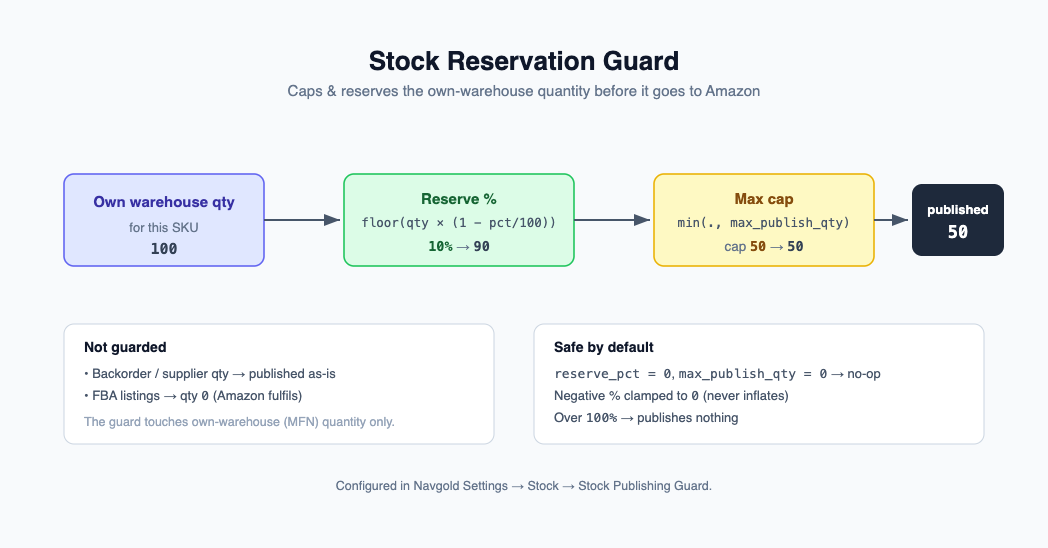
The Stock Reservation Guard caps and reserves the own-warehouse quantity that Navgold publishes in the Amazon listings feed. It lets you hold back a buffer of your own stock and put a hard ceiling on the published number, without touching backorder/supplier quantities.
It is configured globally in Navgold Settings → Stock → Stock Publishing Guard.
Settings
| Field | Type | Default | Meaning |
|---|---|---|---|
| Stock Reserve % | Percent | 0 | Hold back this % of own warehouse stock from the Amazon feed. |
| Max Publish Qty | Int | 0 | Ceiling on published own-stock quantity. 0 = no cap. |
Formula
For a SKU whose own (MFN) warehouse quantity for the feed is own_qty:
published = floor(own_qty * (1 - reserve_pct / 100))
if max_publish_qty > 0:
    published = min(published, max_publish_qty)
The reserve is applied first (and always floors down), then the cap. With binary floating point the
floor errs toward reserving slightly more rather than less, which is the safe direction for a guard.
A negative reserve_pct is clamped to 0 (never inflates), and any value above 100 publishes nothing.
Scope
- Applies to the own warehouse quantity only.
- Backorder/supplier quantity is never reduced by the guard. When a SKU is on its backorder strategy, the published quantity comes from supplier stock and the guard does not apply.
- FBA (Amazon-fulfilled) listings already publish quantity
0from this code path, so they are unaffected.
No-op default
With reserve_pct = 0 and max_publish_qty = 0 the guard is a no-op: floor(own_qty * 1) = own_qty
and there is no cap. Feed output is identical to having no guard configured, so the feature is
inert until you set a value.
Worked example
Own warehouse quantity for the feed is 100.
| Stock Reserve % | Max Publish Qty | Published own qty |
|---|---|---|
| 0 | 0 | 100 |
| 10 | 0 | 90 |
| 0 | 50 | 50 |
| 10 | 50 | 50 |
| 25 | 0 | 75 |
(For the 10% / cap 50 row: floor(100 * 0.9) = 90, then min(90, 50) = 50.)