SFP Backorder Eligibility
SFP Backorder Eligibility
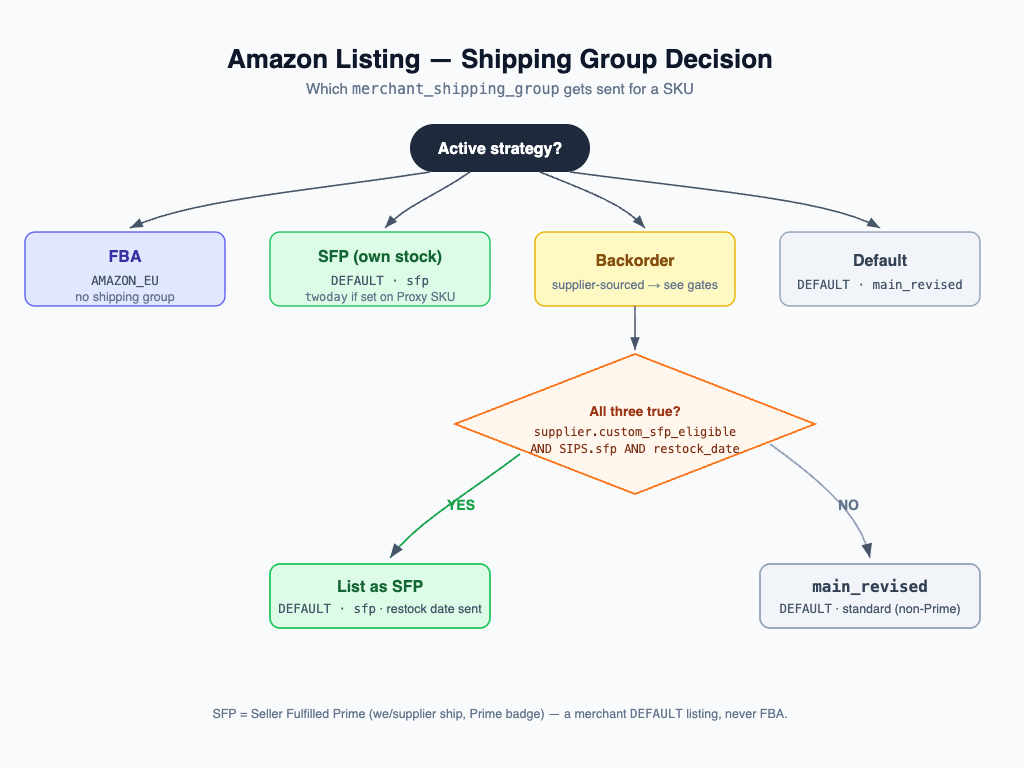
What SFP means here
SFP is Seller-Fulfilled Prime: a Prime listing that you ship yourself from your own
stock, on the merchant DEFAULT channel. It is not FBA (where Amazon holds and ships
the stock). FBA listings carry no shipping group and are unaffected by anything on this page.
When a SKU has no warehouse stock but a supplier can replenish it, the feed lists it as a
backorder. A backorder normally goes out on the main_revised shipping group. This
feature lets a backorder instead go out on the SFP shipping group when the supplier is
genuinely Prime-capable for that specific item.
The two gates
A backorder lists as SFP only when both eligibility gates pass:
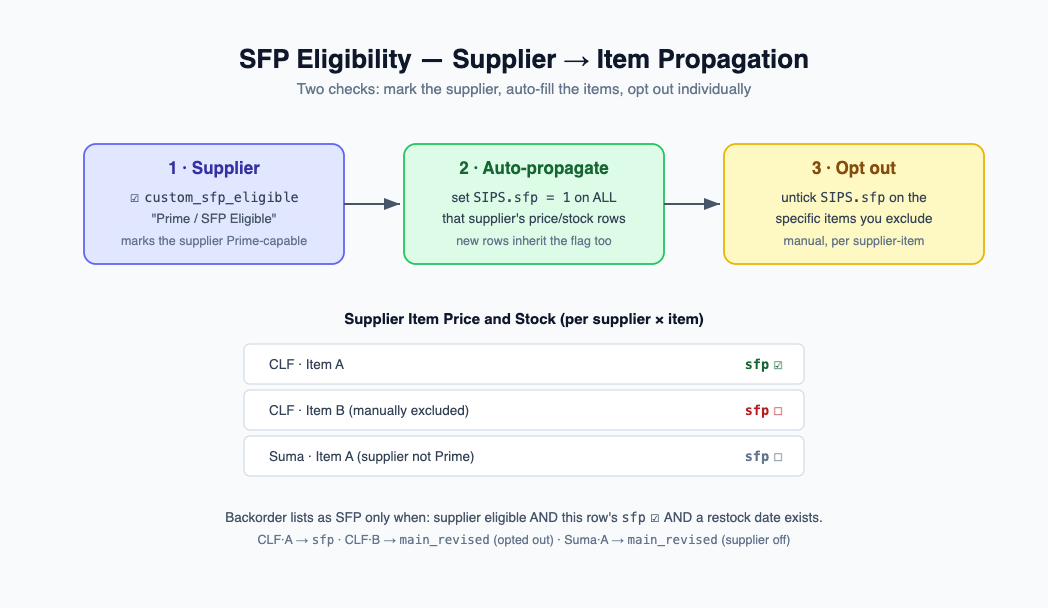
- Supplier gate —
Supplier.custom_sfp_eligible("Prime / SFP Eligible"). The live supplier-level flag, read fresh at feed-build time. Turning it off neutralizes every one of that supplier's items immediately, regardless of per-row flags. - Per-item gate —
Supplier Item Price and Stock.sfp("SFP Eligible"). A per supplier-item flag, so a Prime-eligible supplier can still ship specific items onmain_revisedinstead of SFP.
A third condition is always required: a restock date must be available for the SKU
(from a pending purchase order, or derived from the supplier's lead time). Without a
restock date there is nothing to promise the customer, so the listing stays main_revised.
Auto-propagation and manual opt-out
- New rows inherit the supplier flag. When a Supplier Item Price and Stock row is
created, its
sfpflag defaults to the parent supplier'scustom_sfp_eligible. A new row under a Prime supplier starts Prime-eligible; under a non-Prime supplier it starts off. - Marking a supplier Prime back-fills its rows. When
custom_sfp_eligibleflips on, all existing rows for that supplier are set tosfp = 1in one bulk update. The item gate therefore starts in lockstep with the supplier. - Per-item opt-out is sticky. After back-fill you can untick
sfpon individual rows to keep specific items onmain_revisedwhile the supplier stays Prime overall. - Turning the supplier flag off is non-destructive. When
custom_sfp_eligibleflips off, per-rowsfpflags are left untouched. They no longer have any effect because the live supplier gate already fails — and they are still there if the supplier is re-enabled later.
Decision table
| Channel | Supplier custom_sfp_eligible |
Row sfp |
Restock date | Shipping group |
|---|---|---|---|---|
| FBA | (any) | (any) | (any) | none |
| Backorder | on | on | yes | SFP |
| Backorder | on | off | yes | main_revised |
| Backorder | off | on | yes | main_revised |
| Backorder | on | on | no | main_revised |
In short: a backorder lists as SFP iff the supplier is Prime-eligible and the
supplier-item row is SFP-eligible and a restock date exists. Otherwise it lists as
main_revised. FBA never carries a shipping group.