Guest Booking (OTP)
Guest Booking (OTP, no account)
Some events let you book a ticket without creating a full account first. Instead of signing up, you confirm a quick one-time code (OTP) sent to your email or phone, and Buzz creates a lightweight guest account for you behind the scenes.
This page explains when guest booking is available, and walks you through the verification steps. For the full ticket-buying flow, see Book Tickets.
When you can book as a guest
Guest booking is controlled by the organizer, per event:
- Guest booking enabled — you can fill in the booking form and verify by OTP, no prior login needed.
- Guest booking disabled — you'll be asked to log in before you can continue.
The verification method is also set by the organizer. An event uses one of:
| Method | What you verify |
|---|---|
| None | No code needed — you book as a guest with just your details |
| Email OTP | A code sent to your email address |
| Phone OTP | A code sent to your phone by SMS |
You can browse tickets, apply a coupon, and fill in attendee details without an account. Login (or guest verification) is only required at checkout — the moment you confirm the booking.
Book as a guest, step by step
- Open the event's registration page at
/b/:eventRoute/registerand choose your tickets. - Fill in attendee details. In guest mode you'll also be asked for your name and email (and phone if the event uses Phone OTP).
- Apply a coupon if you have one — this works before any verification.
- Select Book / proceed to checkout. If the event requires OTP, Buzz sends a code and opens the verification dialog.
- Enter the code, then choose Verify & Book.
- Your guest account is created automatically and your booking continues to payment (or completes immediately for free tickets).
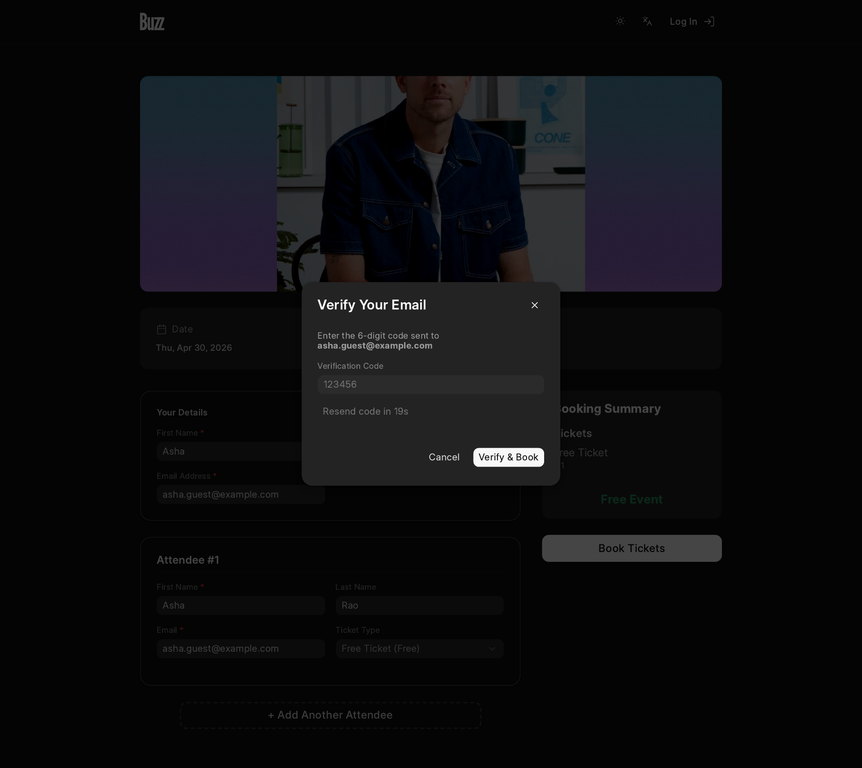
About the code
- The code is sent to the email or phone you entered, depending on the event's verification method.
- It expires in 10 minutes. If it lapses, request a new one.
- Use Resend code if it doesn't arrive — there's a short 30-second cooldown between resends.
- After several incorrect attempts, verification is temporarily locked. Wait a few minutes and try again with a fresh code.
If you already have a Buzz account under the same email, Buzz reuses it rather than creating a duplicate — your booking is linked to your existing account.
What happens under the hood
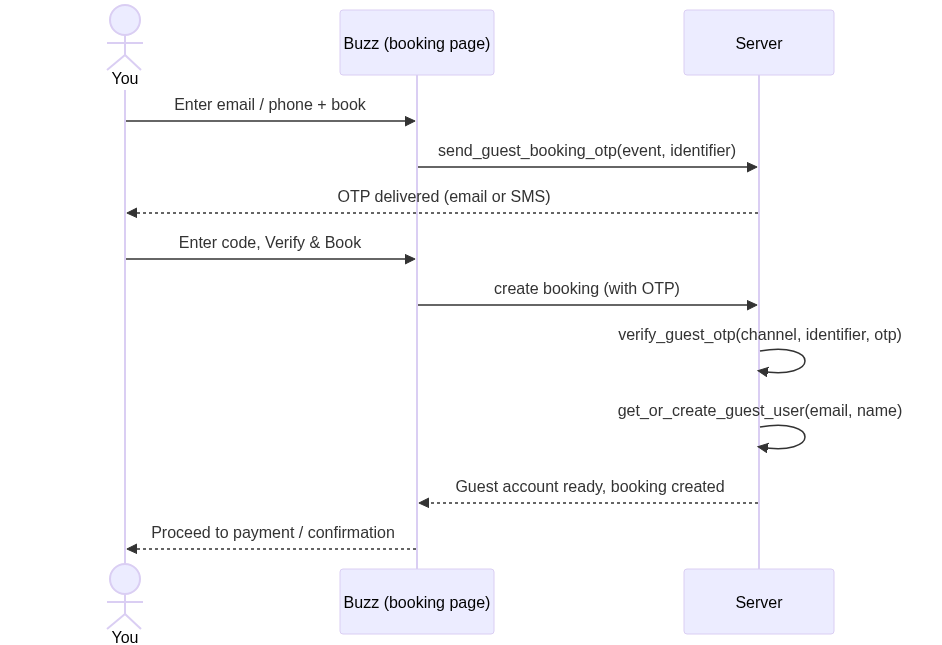
The code is validated server-side at the moment you confirm the booking, so a booking can't be completed without a valid, unexpired code.
Troubleshooting
- "Guest booking is not enabled for this event." The organizer hasn't allowed guest bookings — log in or create an account to continue.
- "Verification code expired. Please request a new one." Codes last 10 minutes; use Resend code to get a fresh one.
- "Invalid verification code." Double-check the digits; after repeated failures, verification locks briefly — wait and retry with a new code.
- Code didn't arrive. Check spam (email) or signal (SMS), confirm the address / number you entered, then resend after the cooldown.
Related
- Book Tickets — the complete ticket-buying flow