Propose an Event (hosting)
Want to host your own event on this Buzz platform? When the organizer opens up proposals, anyone can pitch an event through a public web form — your company details, the dates, and a description of what you want to run. The organizer reviews each pitch, and if yours is approved it is turned into a real event. This page walks you through submitting an event proposal.
Submit your proposal
Event proposals are collected through the Propose an Event web form, served at:
/b/event-proposal
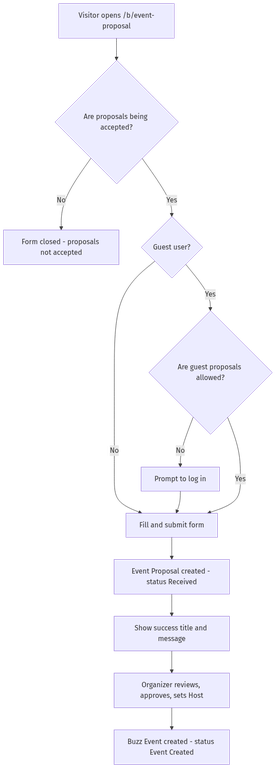
Whether you need to sign in first depends on how the organizer has configured the platform. If guest submissions are turned off, you will be asked to log in (or create an account) before the form appears. If they are turned on, you can submit without an account.
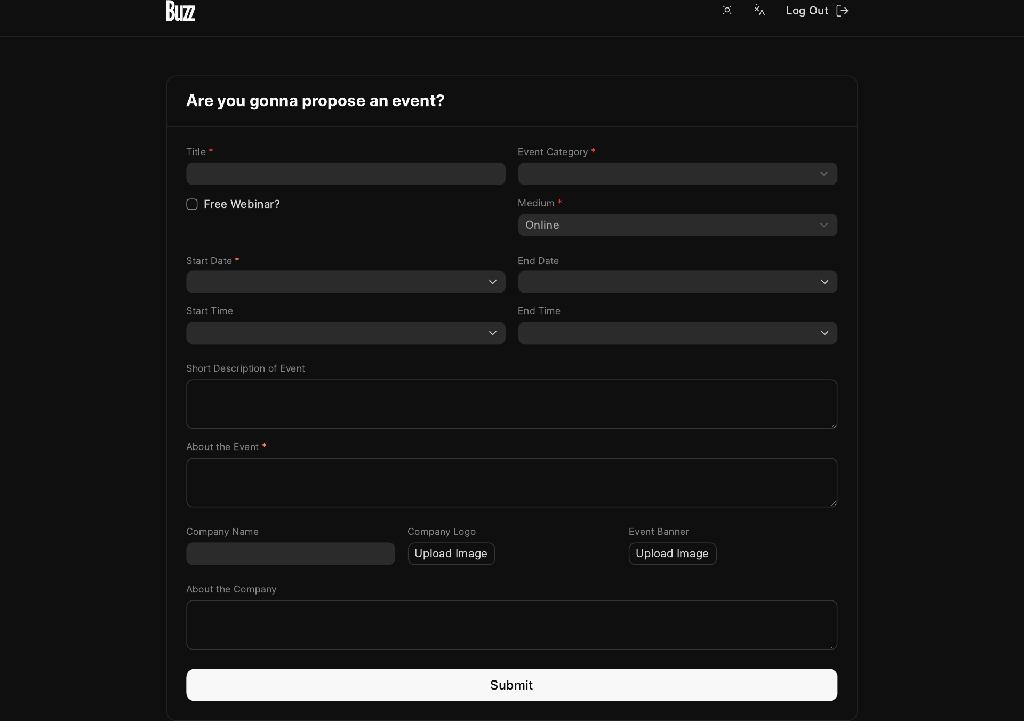
Fill out the form:
| Field | Required | Notes |
|---|---|---|
| Title | Yes | The name of the event you want to host. |
| Event Category | Yes | Pick the category your event fits into. |
| Medium | Yes | Online or In Person. Defaults to Online. |
| Free Webinar? | No | Shown for webinar-style events. |
| Start Date | Yes | Cannot be in the past. |
| Start Time | No | Optional time of day. |
| End Date | No | If set, cannot be before the start date. |
| End Time | No | For same-day events, must be after the start time. |
| Short Description of Event | No | A one-line summary. |
| About the Event | Yes | A rich-text description of what you are running. |
| Company Name | No | The name of your hosting company. |
| Company Logo | No | Used across the site if your event is created. |
| Event Banner | No | A banner image for the event. |
| About the Company | No | A short blurb about who you are. |
The banner heading on the form (for example "Propose an Event") is set by the organizer, so the wording you see may differ.
When you click Submit, your proposal is created with the status Received. If you were logged in, the proposal records your account as the submitter. You then see a confirmation message — its title and body are also configured by the organizer.
What happens after you submit
Your proposal moves through these statuses as the organizer reviews it:
| Status | Meaning |
|---|---|
| Received | Submitted and awaiting review. |
| In Review | The organizer is evaluating your pitch. |
| Approved | Accepted — ready to be turned into an event. |
| Rejected | Not selected. |
| Event Created | An approved proposal that has been converted into a live Buzz Event. |
When an organizer approves your proposal and submits it, Buzz maps it into a new Buzz Event linked back to your proposal, and the status becomes Event Created. (Before that can happen, the organizer assigns a Host to the proposal — that is the hosting record your event hangs off.) A rejected proposal simply stops at Rejected and no event is created.
When the form is unavailable
The proposal form is gated by platform settings. You may run into:
- "Event Proposals are not being accepted" — the organizer has not opened proposals. There is nothing to do but wait until they do.
- A login prompt — guest submissions are turned off, so you need an account before you can submit.
Both behaviors are controlled by the organizer in Buzz Settings. See Buzz Settings for the organizer-side configuration, and the table below for exactly which settings drive this flow.
How an organizer opens proposals
If you are the organizer, the Proposals tab of Buzz Settings controls this form:
| Setting | Field | Effect |
|---|---|---|
| Accept Event Proposals | accept_event_proposals |
Master switch. When off, the form is closed for everyone. |
| Allow Guest Submission | allow_guest_event_proposals |
When on, visitors can submit without logging in. When off, sign-in is required. |
| Banner Title | event_proposal_banner_title |
The heading shown at the top of the form. |
| Success Title | event_proposal_success_title |
The heading on the confirmation screen. |
| Success Message | event_proposal_success_message |
The confirmation body (supports Markdown). |
The three text fields are optional — Buzz falls back to sensible defaults ("Propose an Event" / "Thank you!") when they are left blank.
Flow at a glance
Related pages
- Propose a Talk — pitch a session at an existing event.
- Buzz Settings — organizer-side configuration.