Ticket Types & Inventory
Ticket Types & Inventory
A ticket type is one buyable option for your event — "Early Bird", "VIP", "Student", "Free RSVP", and so on. Each type carries its own price, optional inventory cap, and a published/unpublished switch that controls whether attendees can pick it on the registration page. This guide shows you how to set them up and how Buzz keeps your inventory honest at booking time.
When you publish a new event, Buzz creates one default ticket type for you so registration works out of the box. From there you add as many types as you need.
Create or edit a ticket type
Open Event Ticket Type in Desk (or add one from the event), and fill in:
| Field | What it does |
|---|---|
| Title | The label attendees see, e.g. "VIP" or "Early Bird". |
| Event | The Buzz Event this type belongs to. |
| Price | Per-ticket price in the chosen currency. Set 0 for free tickets. |
| Currency | Currency for the price (defaults to INR). |
| Is Published? | When on, the type can appear on the registration page. Turn it off to retire a type without deleting it. |
| Max Tickets Available | Inventory cap for this type. Leave it 0 for no limit. |
| Auto Unpublish After | Optional last sale date — Buzz unpublishes the type automatically after this date (see below). Only shown while the type is published. |
The Stats section shows two read-only counters:
- Tickets Sold — count of submitted (paid/confirmed) tickets for this type.
- Remaining Tickets —
Max Tickets Available − Tickets Sold, or-1when no cap is set (the no-limit signal).
How "remaining" is counted
Remaining is computed live, not stored:
- If Max Tickets Available is
0, remaining is-1and the type is effectively unlimited. - Otherwise remaining = max minus the number of submitted tickets of that type. Draft or abandoned bookings don't consume inventory until they're submitted.
Publish and unpublish
Only published ticket types are offered on the registration page. Unpublishing is the clean way to pull a type out of sale — past tickets are untouched, but no new attendee can select it.
Two things can unpublish a type:
- You toggle
Is Published?off manually. - The daily scheduler unpublishes any published type whose Auto Unpublish After date has passed — perfect for Early Bird windows that should close on a set date.
Daily auto-unpublish
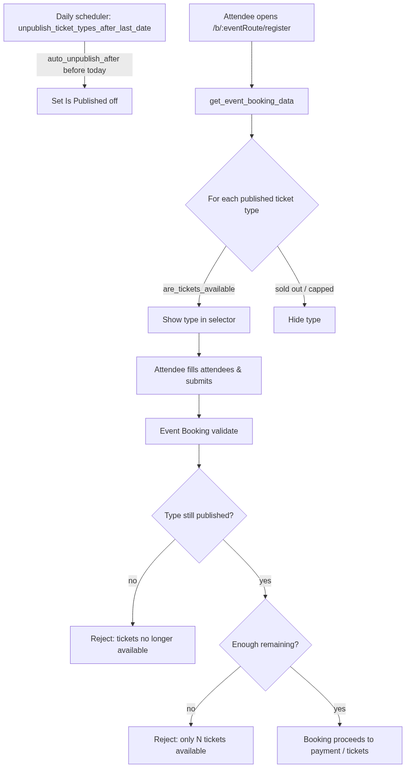
A scheduled job (buzz.tasks.unpublish_ticket_types_after_last_date) runs once per day and sets Is Published? off for every type where the Auto Unpublish After date is earlier than today. Set the date and forget it — you don't need to babysit the sale window.
Because the job runs daily, a type can stay live for part of the day after its date passes, until the job next runs. If you need an instant cutoff, unpublish manually.
Availability enforcement at booking
Buzz enforces availability in two places so a sold-out or retired type can't slip through:
- On the registration page (
/b/:eventRoute/register) — only published types that still have tickets available are offered. A capped type that's sold out simply won't appear in the selector. - When the booking is submitted — Buzz re-checks each selected type. If a type was unpublished or sold out between page load and submit (e.g. another buyer took the last seat), the booking is rejected with a clear message, naming how many tickets are actually left.
This double check matters under load: the registration page is a snapshot, but the submit-time validation is the source of truth.
Note that registration close time on the event is a separate gate from ticket-type availability. Even when types are published and in stock, bookings are blocked once the event's registration window has closed.
Tips
- Tiered pricing (Early Bird → Regular): give Early Bird an Auto Unpublish After date and create a Regular type that's already published. When the date passes, Early Bird drops out and Regular carries on.
- Limited drops: set Max Tickets Available to cap a type; the count of submitted tickets drives "remaining", so unpaid drafts never block real buyers.
- Soft retire: unpublish instead of deleting so reports and existing tickets keep their type reference.
Related
- Add-ons — optional extras attendees can attach to a ticket.
- Book Tickets — the full attendee-side registration flow.