Manage Sponsorships
Manage Sponsorships
Once you've submitted a sponsorship inquiry (see Sponsor an Event), you can track its progress, complete payment when it's approved, update your company logo, and withdraw it if your plans change — all from your account.
View your sponsorship inquiries
Go to /b/account/sponsorships to see every sponsorship inquiry you've submitted, most recent
first. Each row shows the company, event, tier, current status, whether it has become a
confirmed sponsorship, and the date you submitted it.
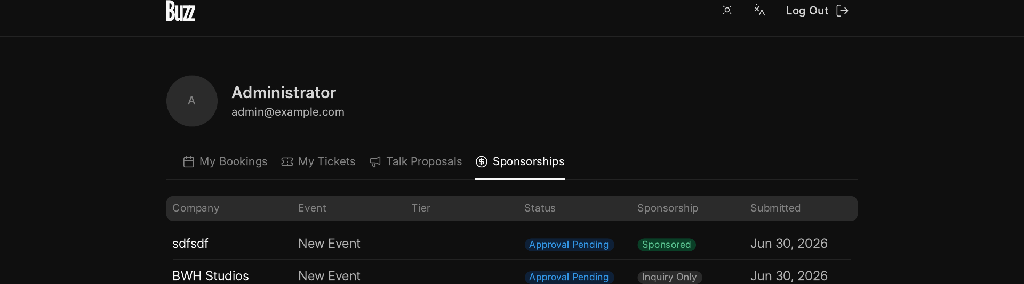
The Status column tells you where each inquiry stands, and the Sponsorship column shows either Sponsored (your payment is confirmed and you're an official sponsor) or Inquiry Only (not yet a confirmed sponsor).
Click any row to open its full details.
Read the details of an inquiry
The details page at /b/account/sponsorships/{enquiryId} shows your company information, the
event and tier you applied for, the submission date, and a status badge. Depending on the
status, you'll also see a contextual banner at the top:
- Awaiting Approval — your inquiry is submitted and waiting for the event team to review it.
- Payment Pending — your inquiry was approved; a Pay Now button lets you complete payment.
- Sponsorship Confirmed — your payment went through and you're now an official sponsor.
- Inquiry Withdrawn — this inquiry is no longer active.
You can update your company logo from this page at any time (before or after the sponsorship is confirmed) using the Change Logo / Upload Logo button.
Status meanings
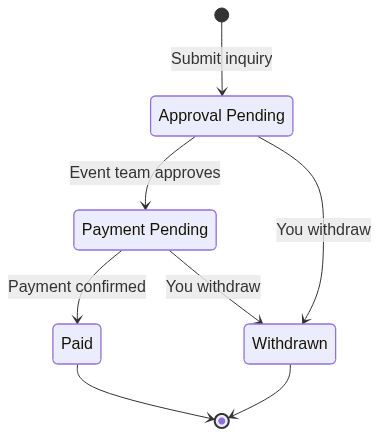
A sponsorship inquiry moves through these statuses:
| Status | What it means |
|---|---|
| Approval Pending | Submitted and waiting for the event team to review and approve it. This is where every inquiry starts. |
| Payment Pending | Approved by the event team. Open the inquiry and use Pay Now to complete payment. |
| Paid | Payment confirmed. You're now an official sponsor of the event. |
| Withdrawn | You withdrew the inquiry. It's no longer active and cannot be revived. |
How a sponsorship inquiry moves through statuses
Withdraw an inquiry
If you no longer want to proceed, you can withdraw an inquiry as long as it hasn't been paid:
- Open the inquiry at
/b/account/sponsorships/{enquiryId}. - Click Withdraw Inquiry in the top-right.
- Confirm in the dialog by clicking Withdraw Inquiry again.
The status changes to Withdrawn and a confirmation message appears.
A few things to keep in mind:
- You can withdraw an inquiry while it's Approval Pending or Payment Pending.
- You cannot withdraw a Paid inquiry — once payment is confirmed, you're a confirmed sponsor. Contact the event team if you need to make changes.
- Withdrawing is final; an already-withdrawn inquiry can't be withdrawn again or reactivated. You'd need to submit a new inquiry to sponsor again.
Related
- Sponsor an Event — submit a new sponsorship inquiry.