Order Cancel & Full-Return Refund Reversal (Coupon / Gift Card / Loyalty)
Order Cancel & Full-Return Refund Reversal (Coupon / Gift Card / Loyalty)
Audience: store admins and support staff. What this covers: what the storefront does to a customer's redemptions — coupons, gift-card balances and loyalty points — when an online order is cancelled or fully returned.
Overview
When a customer places a storefront order they may have redeemed one or more of the following at checkout:
| Redemption | What it does to the order | Where it is recorded |
|---|---|---|
| Coupon (serial) | Applies a discount; the coupon serial is "spent" | Coupon Ledger row, coupon_redemption_transaction = the Sales Order |
| Gift card | Pays part of the order; the card balance is debited | Gift Card.balance, and a custom_payments tender row on the order |
| Loyalty points | Earns (and/or redeems) points on the invoice | Loyalty Journal rows against the Sales Invoice |
All three are surfaced to the shopper in My Account → Discounts:
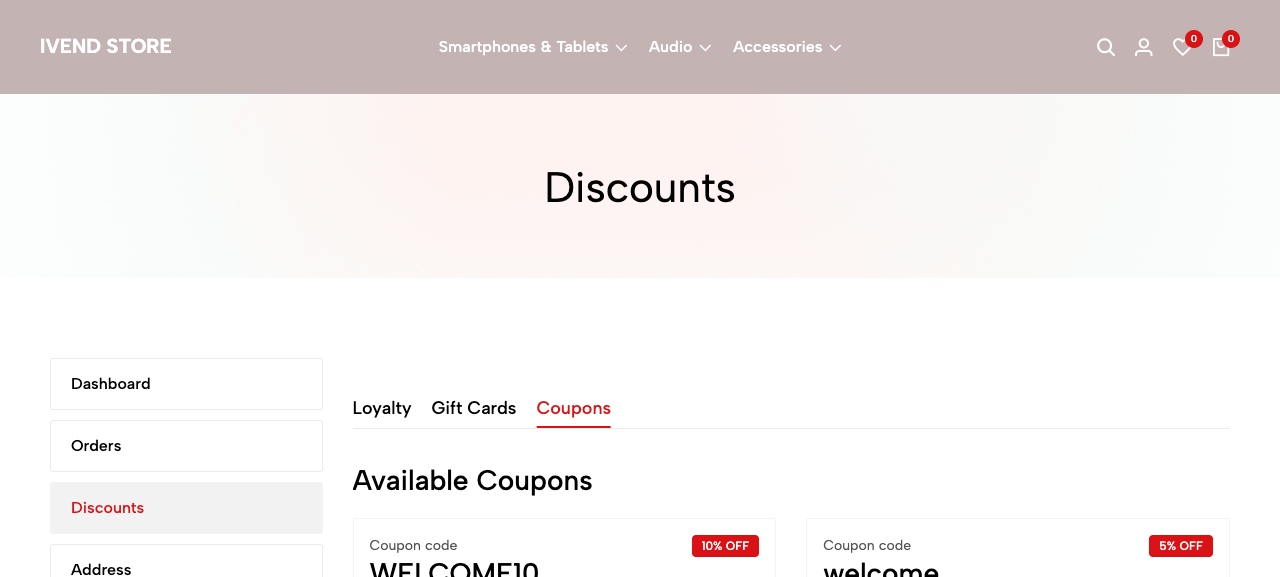
If that order is later cancelled or fully returned, those redemptions must be put back so the customer is not left out of pocket — the coupon should become re-usable, the gift-card balance should be restored, and earned loyalty points should be clawed back.
This feature performs that reversal automatically. It runs in two situations:
- Cancel — the shopper cancels from My Account → Orders (or an admin cancels the Sales Order in Desk) while the order is still early in its lifecycle.
- Full return — every delivered line of the order is returned (a return Delivery Note covering the whole order is submitted).
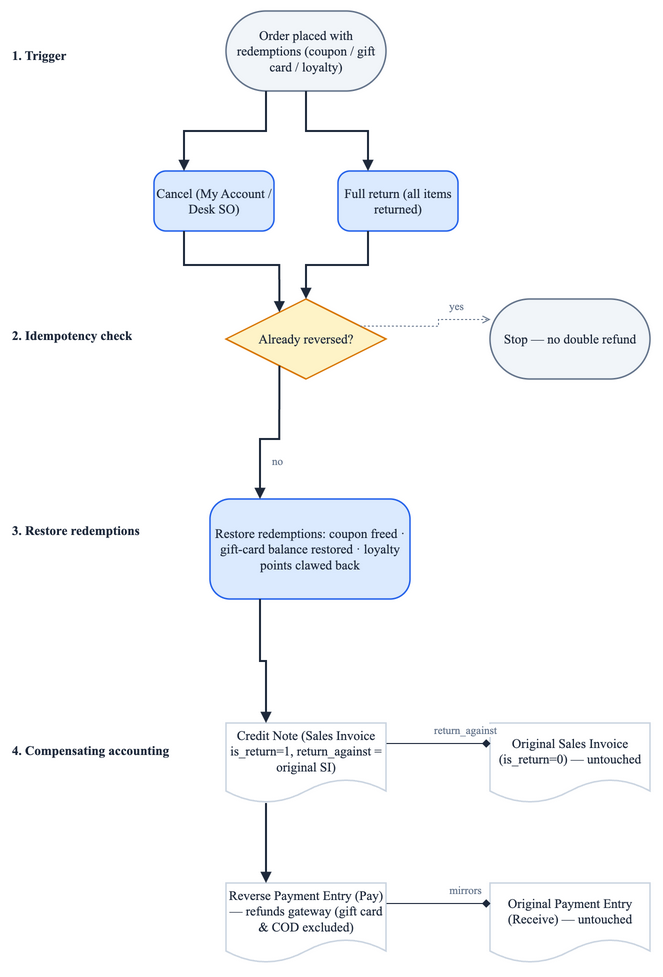
The diagram above is the canonical summary of the whole mechanism. Read the next section for the detail behind it.
How it works
The core idea: reverse with new documents, never cancel the originals
The most important thing to understand: this feature does NOT cancel the original Sales Invoice or the original payment. Instead it creates new, compensating documents that financially undo the order:
- A Credit Note — a Sales Invoice with
is_return = 1andreturn_againstpointing at the original invoice. This is the accounting reversal of the sale. - A reverse gateway Payment Entry — a
PayPayment Entry (the mirror of the originalReceive) that sends the money back out through the same payment mode the customer paid with.
Original sale (left untouched)        Reversal (newly created)
────────────────────────────         ─────────────────────────
Sales Invoice  (is_return = 0)  ◄──── Credit Note (is_return = 1, return_against = SI)
Payment Entry  (Receive)        ◄──── Payment Entry (Pay)  ← reverse refund
What gets reversed, per redemption type
When a reversal runs, reverse_order_discounts() (api/discounts/reversal.py) walks the order and undoes each redemption:
Coupon (serial)
For each serial coupon row on the order (custom_ivend_coupons), the matching Coupon Ledger row has its coupon_redemption_transaction cleared back to empty. That frees the serial so it can be applied to a future order.
Code path: restore_serial_coupons().
Gift card
For each gift-card tender row (custom_payments with mode of payment Gift Certificate), the redeemed amount is added back to Gift Card.balance. A face-value cap is applied only when the card's total is set, so the restore can never push the balance above the card's face value (and never zeroes a card whose total is blank). A Comment marker is written on the card so a repeat restore is skipped.
Code path: restore_gift_card_balances().
Loyalty points
Loyalty is reversed by the credit note itself. When the return invoice (is_return=1) is submitted, the sibling ivend_loyality app's Sales Invoice on_submit engine claws back the points earned on the original invoice — proportionally, honouring the loyalty program's return rules. The ecommerce app no longer does its own clawback: the former refund_loyalty_points() and the dead skip_loyalty flag were removed, so points are now reversed exactly once (see Resolved issues below).
Code path: native ivend_loyality credit-note on_submit; the ecommerce app intentionally does nothing here.
The refund payment (non-COD)
The cash leg is refunded with a Pay Payment Entry built from get_payment_entry() on the credit note. The refund amount is taken from the credit note's grand_total, not its outstanding_amount — because ERPNext can auto-reconcile the outstanding amount to zero on submit, which would otherwise wrongly skip the refund. Gift-card tender is excluded from this cash refund (the gift card is restored as balance instead, above). COD orders take no automatic cash refund — their cash-equivalent is issued as store credit by a deliberate, staff-gated action (see COD store credit below).
Code path: orders.refund_invoice_payment().
One locked path, idempotent
Every trigger — the storefront cancel, the Desk Sales Order on_cancel hook, and the full-return Delivery Note — funnels through a single function, orders.perform_order_reversal(), which holds a per-order lock (filelock("reverse-order-<name>")) so two concurrent cancels can never both pass the guards and double-refund. Idempotency rests on ledger facts — the existing credit note, the submitted refund Payment Entry, and the custom_ecommerce_status — not on deletable Comments. It is safe to re-run (double-click, retry, cancel-then-return).
How to use it
About the screenshots below. The Desk-side artifacts (Sales Order, Credit Note, Gift Card, Coupon Ledger, cancelled-order list) are live captures from the running site. The storefront shopper screens are shown where the demo Administrator login can reach them; the in-order Cancel Order / Return Order buttons only render for the storefront customer who owns the order, so those specific controls are described from the code and conveyed by the flow diagram rather than live-captured. Each image is labelled accordingly.
As a shopper / support agent — placing and then cancelling an order
-
Place an order with a redemption applied. In the storefront cart, apply a coupon (and/or pay with a gift card, and/or redeem loyalty points), then check out and pay. The available coupons, gift cards and loyalty appear under My Account → Discounts (shown in the Overview above).
-
Open the order under My Account → Orders. Each order card shows its status and, while the order is still early in its lifecycle, a Cancel Order control. (The capture below is the live storefront Orders page; it is empty under the demo Administrator login, which owns no storefront orders.)
-
Cancel — click Cancel Order and confirm. The button (
templates/macros/cancel_order_button.html) is only shown while the e-commerce status is Waiting for Approval or Order Received (i.e. before it ships), and callsapi.orders.cancel_order.On confirm, the system:
- clears the coupon serial (re-usable again),
- restores the gift-card balance,
- lets the credit note claw back earned loyalty points (once, natively),
- creates a Credit Note against the invoice,
- for gateway orders, creates a reverse Payment Entry that refunds the gateway payment; for COD, creates no cash refund (store credit is issued separately — below),
- sets the order's e-commerce status to Cancelled.
-
Or do a FULL return — for a delivered order, use Return Order (
templates/macros/return_button.html) and select every item on the order. When the full-return Delivery Note is submitted, the same reversal runs (credit note + refund/store-credit + redemption restore) and sets the status to Returned. Selecting only some items produces a return Delivery Note but no refund (see Limitations).
COD store credit (Desk, staff-gated)
A COD order collects no online tender, so the reversal never auto-refunds cash for it. Instead the cash-equivalent is returned as store credit, on a deliberate human action:
- On a cancelled or returned COD Sales Order in Desk, staff see an Issue Store Credit button.
- Clicking it opens a dialog prefilled with the cash actually collected (editable, capped at the credit-noted total).
- Submitting mints one store-credit Gift Card (
ECOM-SC-<order>,use_as_store_credit = 1,balance = amount) and links it onSales Order.custom_store_credit_gift_card.
The button only appears when the order is COD, already reversed, and no card has been issued yet — a second issue is blocked by the linked-card field, so it is idempotent. This keeps a human in the loop deciding whether COD cash was really collected, so credit is never minted for cash that never arrived.
Code path: api/store_credit.py (get_cod_store_credit_context, issue_cod_store_credit); button in public/js/extends/sales_order.js.
As an admin — what to look for in Desk
After a cancel or full return you can verify the artifacts in Desk. The captures below are live from the site.
-
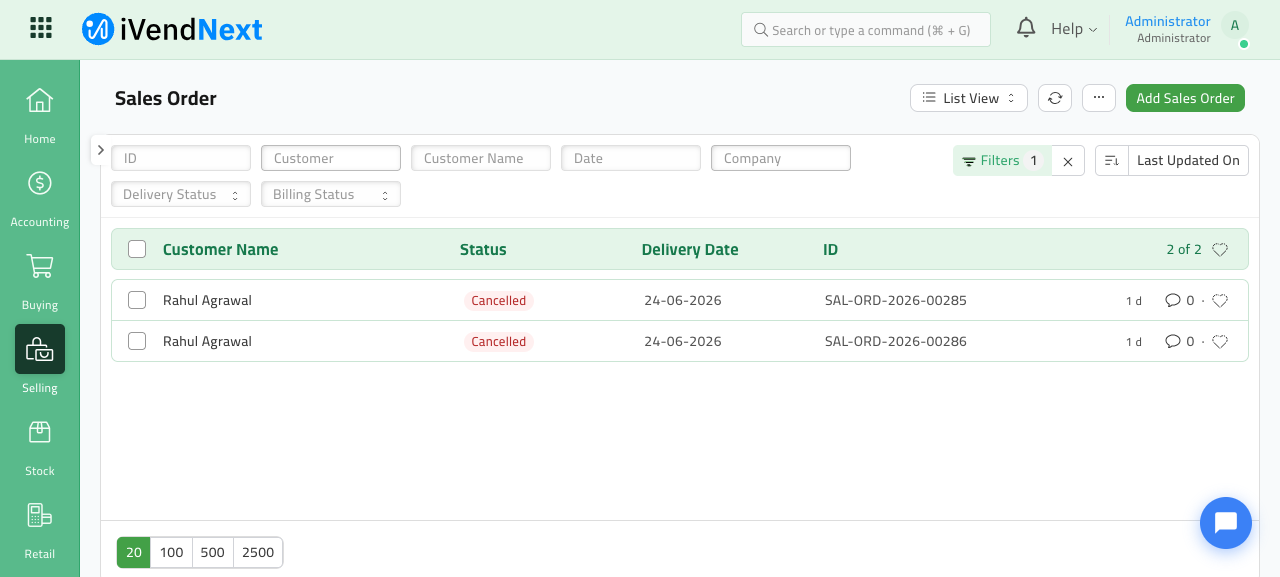
The Sales Order shows status Cancelled (or Returned). Storefront orders carry
Order Type = Shopping Cartand an Ecommerce Status ofCancelled.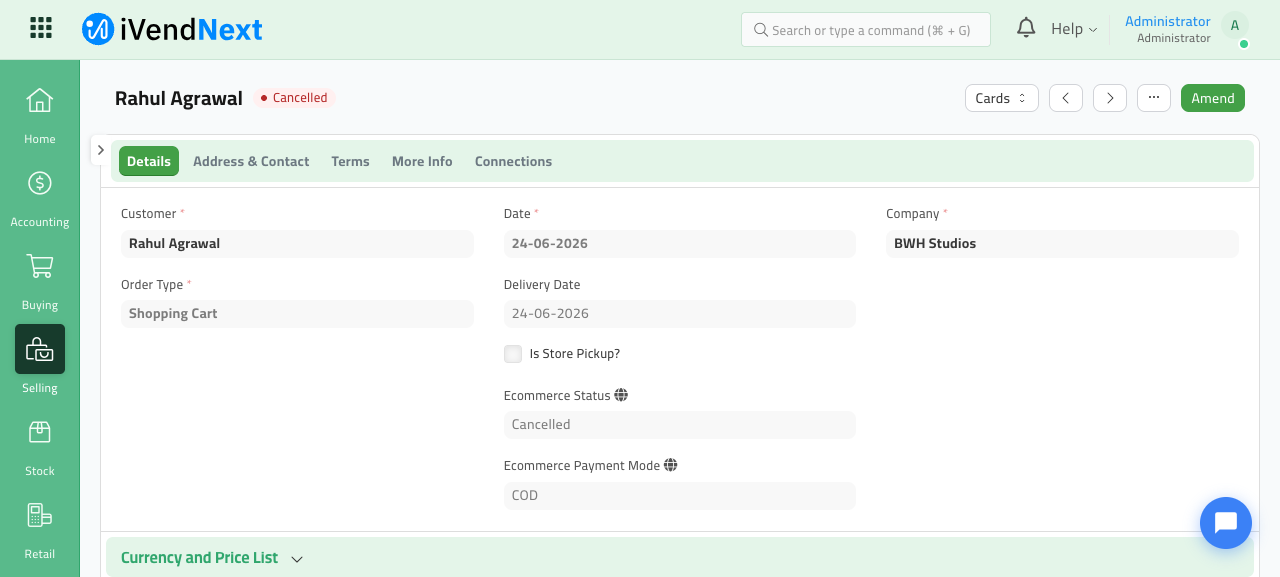
Cancelled storefront orders are easy to find by filtering the Sales Order list on Ecommerce Status = Cancelled:
-
A Credit Note (Sales Invoice with
Is Returnchecked) exists, linked via Return Against to the original invoice — note the original invoice is not cancelled, the credit note is a new document against it.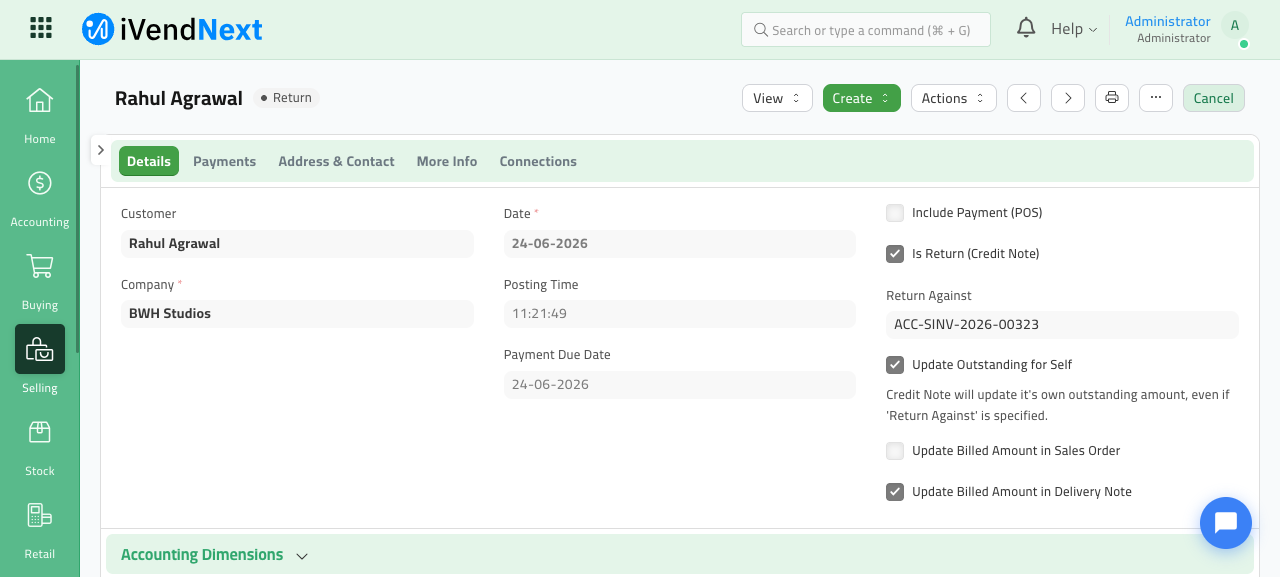
-
A reverse Payment Entry of type Pay mirrors the original Receive and refunds the gateway. (Illustrative — no reverse Payment Entry existed in the live site at capture time, because the cancelled demo orders were COD; the cash-refund leg is shown in the flow diagram. COD orders never create one.)
-
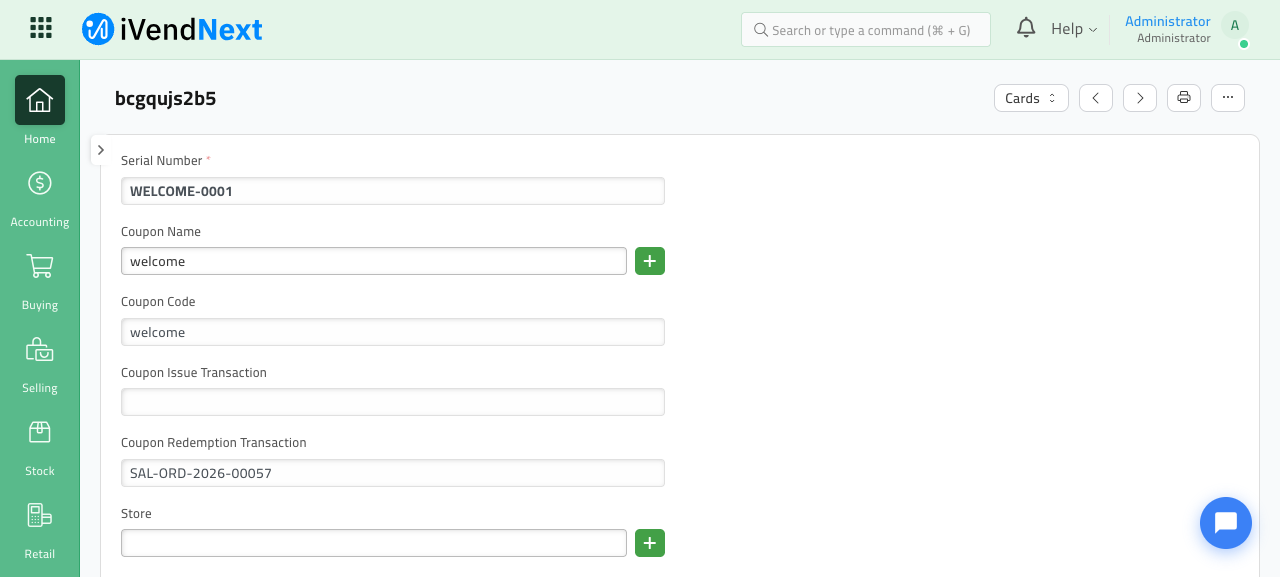
The Coupon Ledger row for a serial coupon: while redeemed it carries the order in Coupon Redemption Transaction (below); the reversal clears this field so the coupon is re-applicable.
-
The Gift Card shows its Balance after a restore. (Live card below — note its balance can exceed the card's Total, which is exactly the over-credit behaviour flagged in Known Issues.)
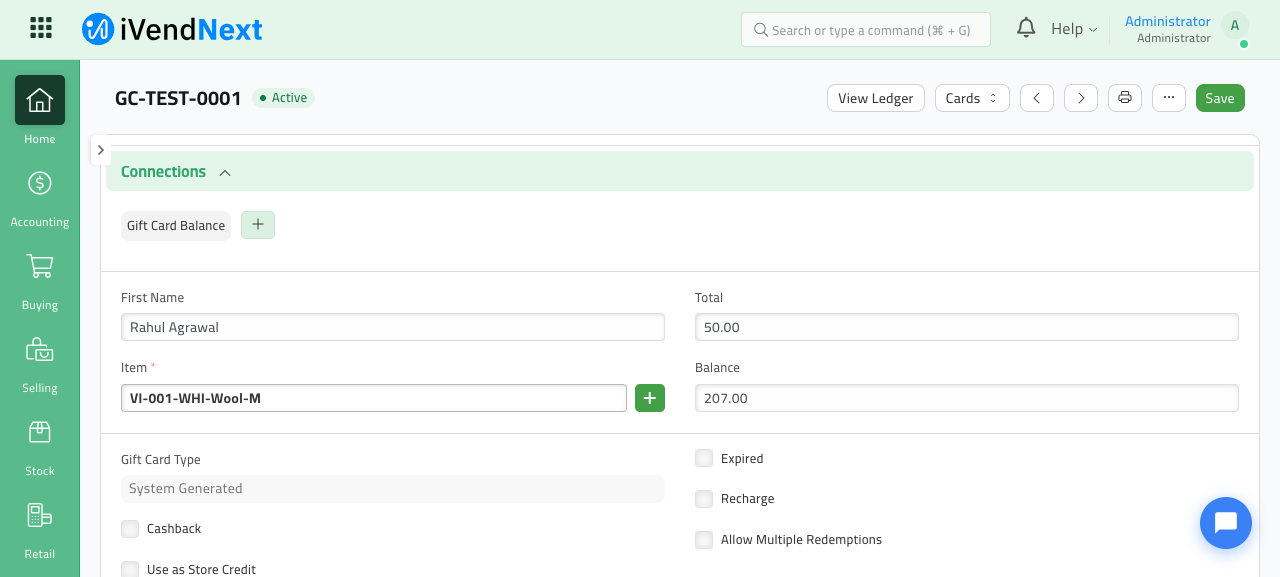
The original Sales Invoice and original Payment Entry remain submitted and untouched — the reversal is the new pair of documents, by design.
Limitations & known issues
Read this section carefully before relying on the feature for money-bearing reversals. These are documented honestly from the code and the PR review.
Functional limitations (by design)
- Full-return only — partial returns get NO refund. The return path only reverses when every ordered line has been returned (
is_full_returnchecks that returned qty ≥ ordered qty for all items). A partial return creates the return Delivery Note but does not create a credit note, refund, or any redemption restore. There is no proportional/partial refund. - Serial coupons only. Coupon restore works for serial coupons (those with a
Coupon Ledgerrow keyed by serial number). Non-serial coupons are intentionally not handled — they leave no ledger trace to revert, so cancelling an order that used a non-serial coupon will not "give the coupon back." This is a deliberate scope decision, not a silent failure. - COD orders have nothing to refund. Cash-on-delivery orders have no gateway Payment Entry, so no reverse payment is created (the coupon/gift-card/loyalty restores still run).
- Cancel is only offered pre-shipment. The storefront Cancel button appears only while status is Waiting for Approval or Order Received. After that, the customer must use the return flow.
Resolved by the hardening pass
A follow-up go-live money audit hardened the flow. These previously-HIGH issues are now fixed:
- Loyalty double clawback — FIXED. The app-side
refund_loyalty_points()and the deadskip_loyaltyflag were removed. Loyalty is now reversed once, natively, by the credit note's ownivend_loyalityon_submitengine — proportionally and per the program's return rules. A regression test asserts exactly one clawback row. - Gift-card tender refunded as cash — FIXED. A second refund path (the
on_canceltender-reversal) used to pay all received tender back as cash — including the gift-card portion — on top of restoring the card balance, double-compensating the gift-card amount. That path was deleted; every refund now goes through the singlerefund_invoice_payment()road, which excludes gift-card tender. Gift-card value is only ever restored to the card, never paid out as cash. - Races / double-refund on retry — FIXED. All triggers funnel through
perform_order_reversal()under a per-order lock, with ledger-based idempotency.
Still open — read before relying on it
- Gift-card over-credit when the card was floored on redeem. At redeem time the deduction is floored at zero (
max(balance - applied, 0)), so if a card was drained between apply and redeem the actual amount taken can be less than the nominal tender amount. On cancel the restore re-credits the nominalrow.amount, not the actual delta, so a card can be credited back more than was ever taken (real deduction 20, restore credits 50 → +30 phantom), capped only at the card'stotal. Fix (restore the recorded delta) is pending — unchanged by the hardening pass. Watch for: gift-card balances that come back higher than expected after a cancel. custom_ecommerce_payment_modedefaults to"COD". Any Sales Order created without explicitly setting the mode is treated as COD, which takes the no-auto-cash-refund path. Storefront checkout always sets it, so production is safe — but imports/backfills/tests must set it.Sales Order on_cancelhook is ungated. The reversal hook fires for every Sales Order cancellation bench-wide, not just storefront orders (the return handler is correctly gated oncustom_ecommerce_status). For non-storefront orders there are usually no coupon/gift-card/loyalty rows and no ecommerce invoices, so it is effectively a no-op, but the hook is broader than it should be. (MEDIUM.)
Reference
- Code:
ivendnext_ecommerce/api/orders.py(perform_order_reversal,refund_invoice_payment),api/return.py,api/invoices.py,api/discounts/reversal.py,api/discounts/gift_card.py,api/store_credit.py(COD store credit),utils.py(order_fully_credit_noted),hooks.py(doc_events),public/js/extends/sales_order.js(Issue Store Credit button), and theSales Order.custom_store_credit_gift_cardcustom field. - Tests:
ivendnext_ecommerce/tests/test_order_cancel_reversal.py— 25 real-DB scenarios covering cancel-without-invoice, single credit-note + refund, idempotency, gift-card restore, full-return trigger, refund status, serial coupon revert, the gift-card-not-refunded-as-cash regression, native-loyalty-reversed-once (via the real credit-note engine), COD-skips-gateway-refund, and the store-credit issue / validation / idempotency path. The COD store-credit flow is additionally verified end-to-end in the Desk UI. - PR: the reversal flow (
feat(orders): order cancel + full-return reversal) plus the follow-upfix(orders): harden order reversal — single refund path, lock, native loyalty, COD store creditwhich resolved the loyalty double-clawback and gift-card double-refund and added the COD store-credit path.