Storefront Search
Audience: store administrators and implementers.
App: ivendnext_ecommerce. Feature delivered across PR #1 (Storefront search & browse powered by SQLite FTS5), PR #11 (Configurable search-result card), PR #12 (Configurable product search content fields).
Overview
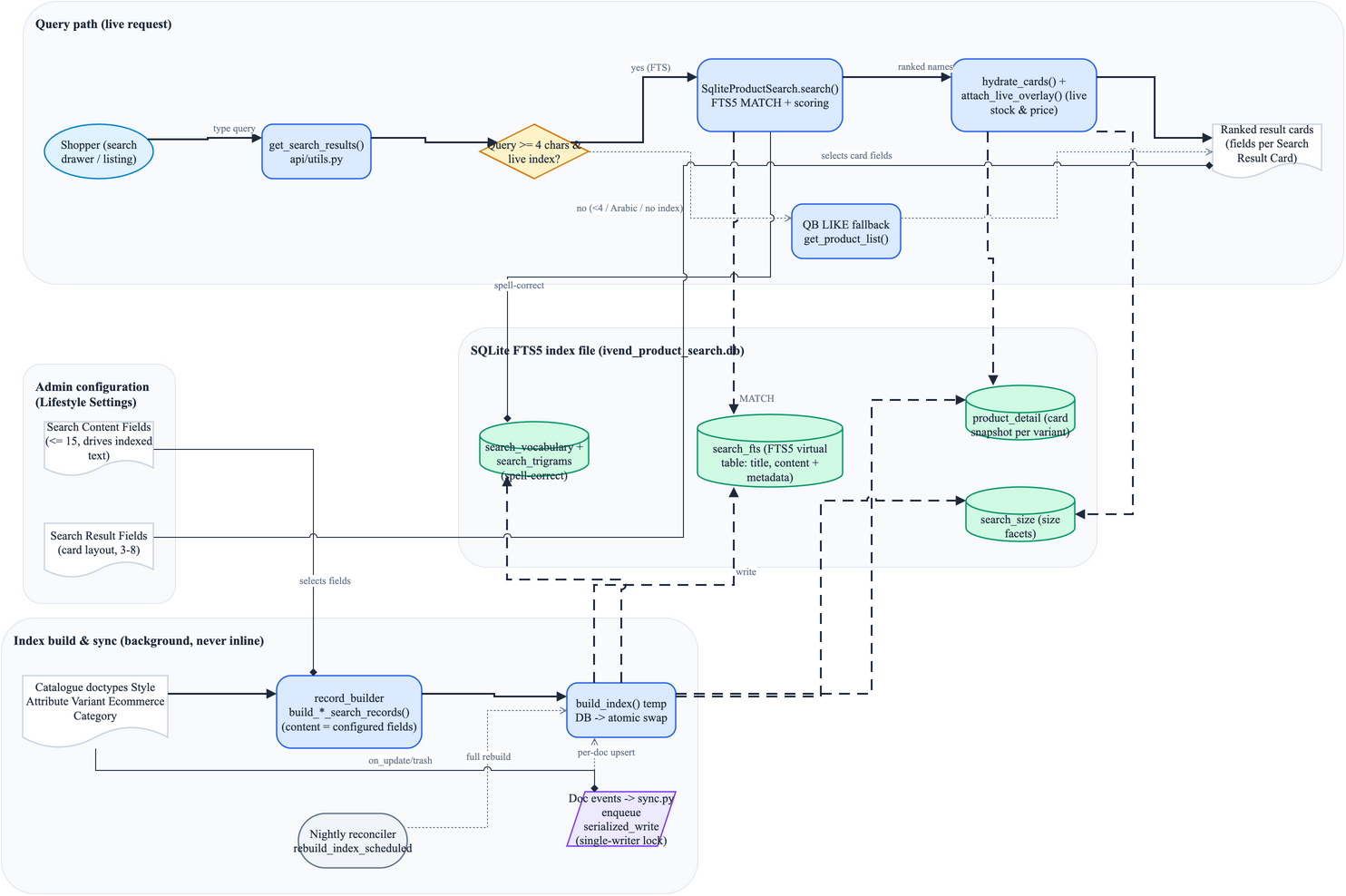
Storefront Search gives shoppers a fast, typo-tolerant way to find products from the store header and to browse the full catalogue. It is powered by an on-disk SQLite FTS5 (full-text search) index that is kept separate from the main site database, so search queries never load the transactional tables.
Two surfaces use it:
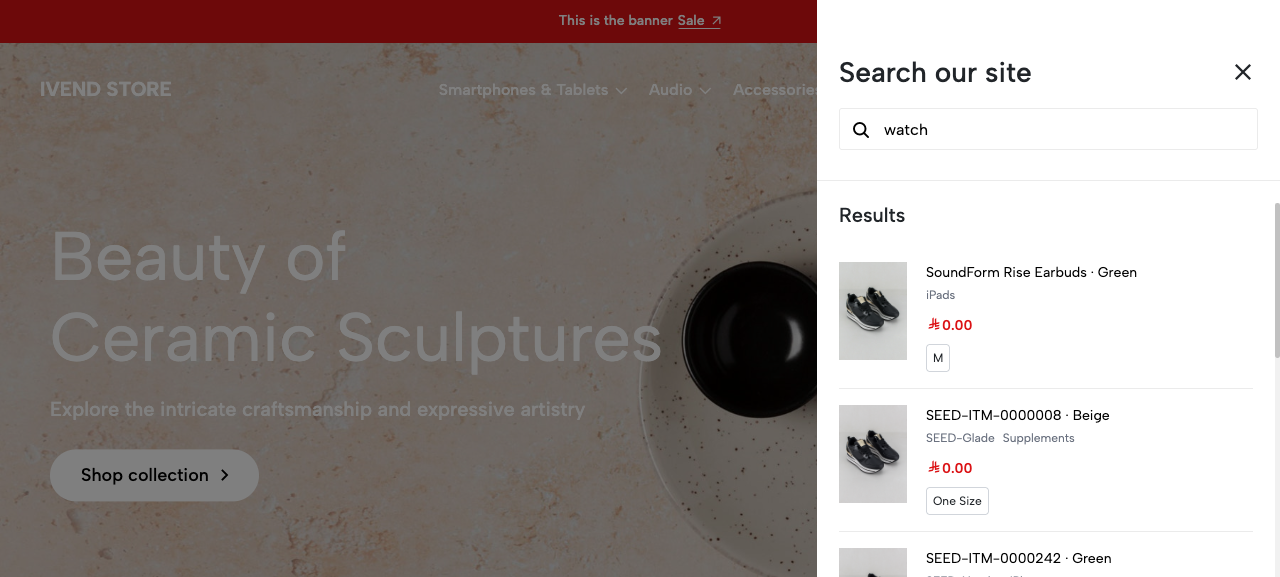
- The search drawer ("Search our site") that slides in from the header search icon and shows ranked product cards as the shopper types.
- The product listing / browse page (
/<lang>/products), which uses the same index to rank a full search-results page and to power the category-navigation Filter drawer and the Relevance sort.
What the index covers today:
- Style Attribute Variant (the sellable product variants) where
is_published = 1 - Ecommerce Category where
enabled = 1
How it works
The FTS5 index file
The index lives in a single SQLite file per site:
sites/<your-site>/ivend_product_search.db
Inside that file the engine maintains several tables:
| Table | Purpose |
|---|---|
search_fts |
The FTS5 virtual table. Text columns title and content are full-text searchable; metadata columns (item_group, brand, color, route_slug, effective_price, has_discount, plus doctype/name) are stored for filtering and sorting. Tokenizer: unicode61 remove_diacritics 2. |
product_detail |
One snapshot row per published variant holding everything needed to render a result card (display name, image, prices, brand, item group, etc.). |
search_size |
The size options per variant, used for the size chips on cards. |
search_vocabulary + search_trigrams |
Word list and trigrams used for spelling correction / fuzzy matching. |
The searchable content text for each product is composed from configurable catalogue
fields (see Configuration); title is the product display name.
Query flow
- The shopper types in the search drawer. Alpine debounces input (300 ms) and calls the
whitelisted endpoint
ivendnext_ecommerce.api.utils.get_search_results. get_search_resultsdecides the path:- If the term is at least 4 characters, is not Arabic script, and a live index
exists, it runs the FTS engine (
SqliteProductSearch.search) and returns the top 6 ranked products for the drawer. - Otherwise it falls back to the framework query-builder
LIKEsearch (get_product_list), also capped at 6 rows.
- If the term is at least 4 characters, is not Arabic script, and a live index
exists, it runs the FTS engine (
- The FTS engine expands the query with spelling corrections, builds an FTS5
MATCHquery, runs it againstsearch_fts, ranks the hits (BM25 plus a custom scoring pipeline that boosts title matches and recency), and returns ranked variant names. - The ranked names are hydrated into cards from
product_detail/search_size(preserving rank order), then a single batched pass overlays live stock and the live display price on top of the indexed snapshot. - The drawer renders the cards; the fields shown are controlled by the Search Result Card configuration.
See search-flow.png / search-flow.drawio for the full architecture diagram.
The minimum-query-length floor
All FTS paths share one floor: MIN_QUERY_LENGTH = 4. Below 4 characters the FTS engine
returns nothing, and:
- For the search drawer / search-results page, queries of 1–3 characters are served by
the query-builder
LIKEfallback instead (so the box is not empty for short input — it just is not FTS-ranked). - FTS only appends a prefix wildcard (
term*) for terms of length 4 or more; shorter terms inside a longer multi-word query are matched exactly.
Arabic queries
Arabic-script queries bypass FTS and use the LIKE fallback, because the FTS prefix-match
path is tuned for the Latin tokenizer.
How the index is built and kept fresh
Index writes are never performed inline in a web request — SQLite FTS is single-writer, so all builds and updates run on background queues.
- Full build / rebuild (
build_index): builds into a temporary DB and then atomically swaps it into place. The manual entryrebuild_index(whitelisted, System Manager only, rate-limited to 5/hour) and the nightly reconcilerrebuild_index_scheduledboth drop the existing index file first, so a scheduled or manual rebuild is a clean, full re-read of the catalogue. Builds run on thelongqueue and are resumable. - Per-document sync: editing, renaming, or deleting a
Style Attribute VariantorEcommerce Categoryfires doc events (search/sync.py) that enqueue a single-document upsert/remove, serialized under a cache lock. If the index has not been built yet, the sync is a no-op (the first build is the reconciler). If the lock can't be acquired in time, the edit is skipped and reconciled by the next nightly rebuild. - Fresh sites: at install/migrate a backstop (
ensure_index_built) enqueues a one-time build when there is a published catalogue and no usable index.
An index built against an existing file upserts in place and does not remove rows for documents that vanished via bulk paths that skip doc events. Because the manual and nightly rebuilds drop the file first, this is reconciled automatically every night; the per-document sync alone does not prune such orphans.
Configuration
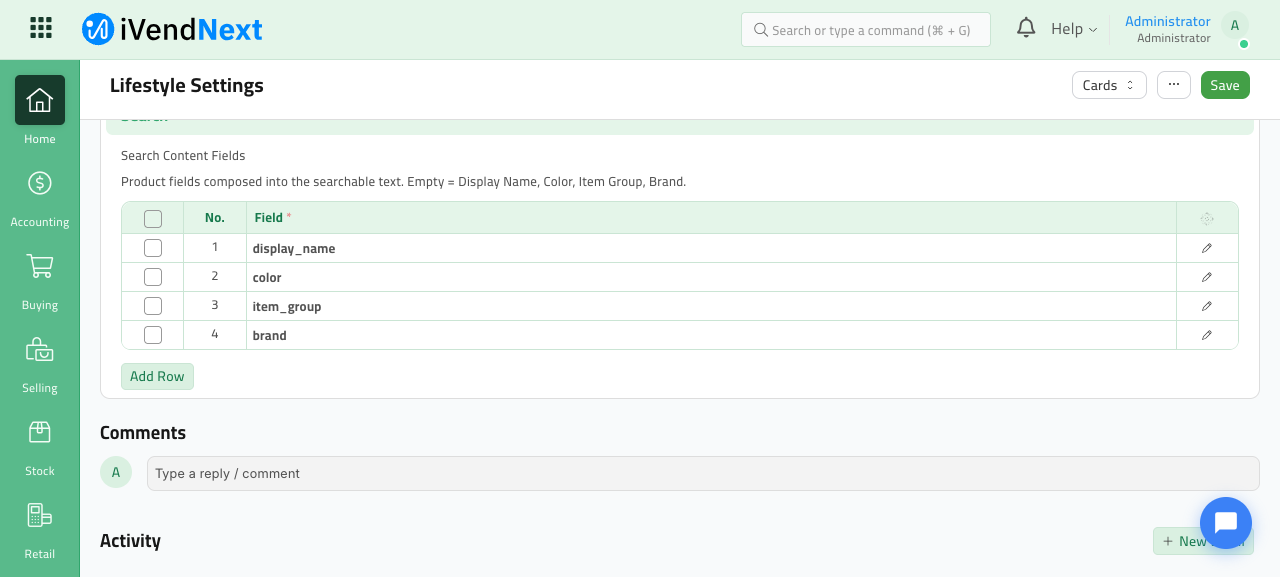
All configuration lives on Lifestyle Settings (Desk → search for "Lifestyle Settings"), on the default tab, in two sections: Search Result Card and Search.
Configuring searchable content fields
The Search → Search Content Fields table controls which catalogue fields are composed
into each product's searchable content text. Each row picks one field from a fixed
catalogue:
| Field key | Label |
|---|---|
display_name |
Display Name |
brand |
Brand |
color |
Color |
item_group |
Item Group |
item_name |
Item Name |
custom_item_name_ar |
Item Name (Arabic) |
Rules and behaviour:
- Empty table = the default set: Display Name, Color, Item Group, Brand.
- At most 15 fields may be indexed (
You can index at most 15 search content fields.). - Duplicate or unknown fields are rejected on save.
attribute_nameis intentionally not offered — it is byte-identical tocolor, so indexing it would only duplicate tokens.- Changing the field list automatically enqueues a full background rebuild of the index so the searchable text is regenerated.
Configuring the result card
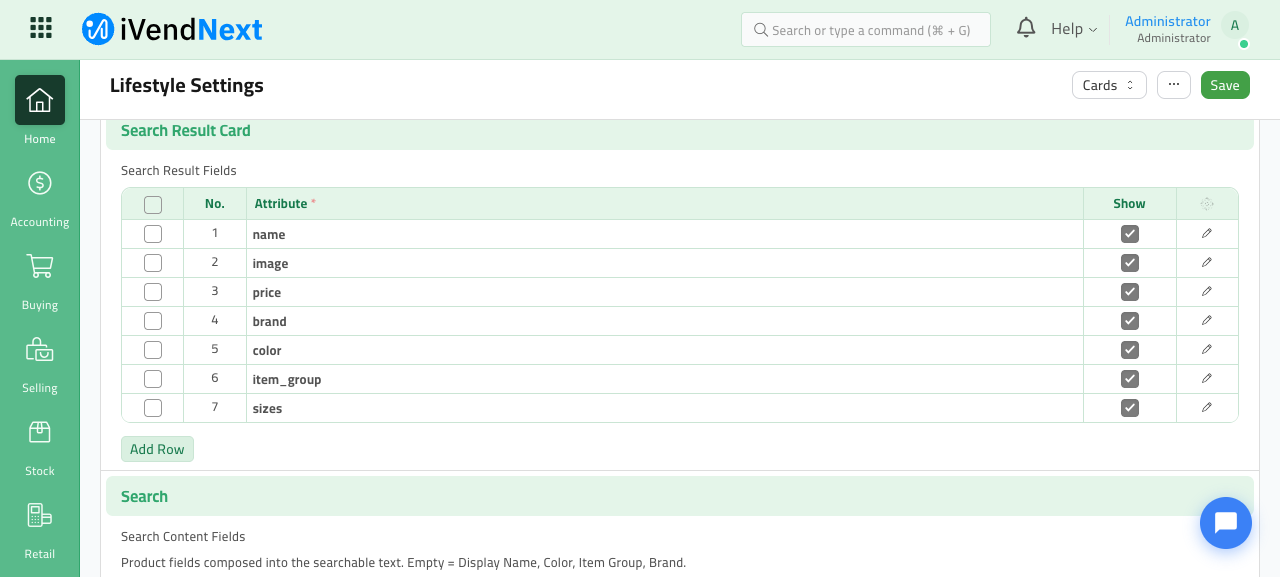
The Search Result Card → Search Result Fields table controls which attributes appear on a result card and in what order. Each row has a field and a Show checkbox.
Catalogue and rules:
| Field key | Label | Notes |
|---|---|---|
name |
Name | Mandatory (always shown) |
image |
Image | Mandatory |
price |
Price | Mandatory |
brand |
Brand | Optional meta line |
color |
Color | Optional (shown inline with the name) |
item_group |
Item Group | Optional meta line |
sizes |
Sizes | Optional size chips |
- Empty table = the default layout: Image, Name, Color, Price.
- The three mandatory fields (
name,image,price) must stay enabled. - Between 3 and 8 fields may be enabled; no duplicates; unknown fields are rejected.
- A migration seeds the default rows so the layout is visible and editable in Desk (re-running migrate never overwrites an admin's choices).
The card layout applies to both the search drawer and the search-results listing cards.
(The underlying child doctype is Search Content Field / Search Result Field, routes
/app/search-content-field and /app/search-result-field; in practice you configure them
through the Lifestyle Settings grids shown above, not as standalone records.)
Using search
The search drawer
Clicking the header search icon opens the "Search our site" drawer:
- With an empty box it shows Quick links (top categories + All Products).
- As the shopper types (debounced), up to 6 ranked products appear, each card showing the configured fields: image, name (with colour), an optional brand / item-group meta line, the price (with a struck-through original price when on sale), and optional size chips.
- Pressing Enter or the search button navigates to the full results page
/<lang>/products?search=<term>.
Browse and search-results listing
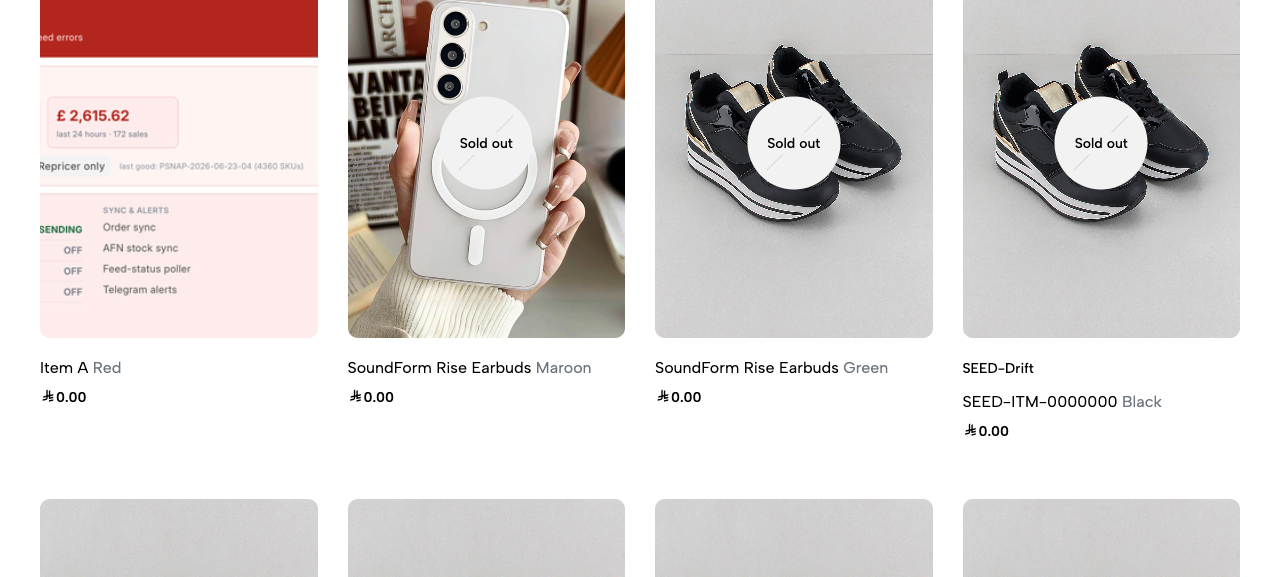
The product listing at /<lang>/products shows the catalogue grid of product cards.
- A sort dropdown sits above the grid. When a search term is active and ranked by FTS,
the sort defaults to Relevance; no-term browse defaults to New Arrivals. Other
sorts (price low/high, name, discount) are served from the indexed
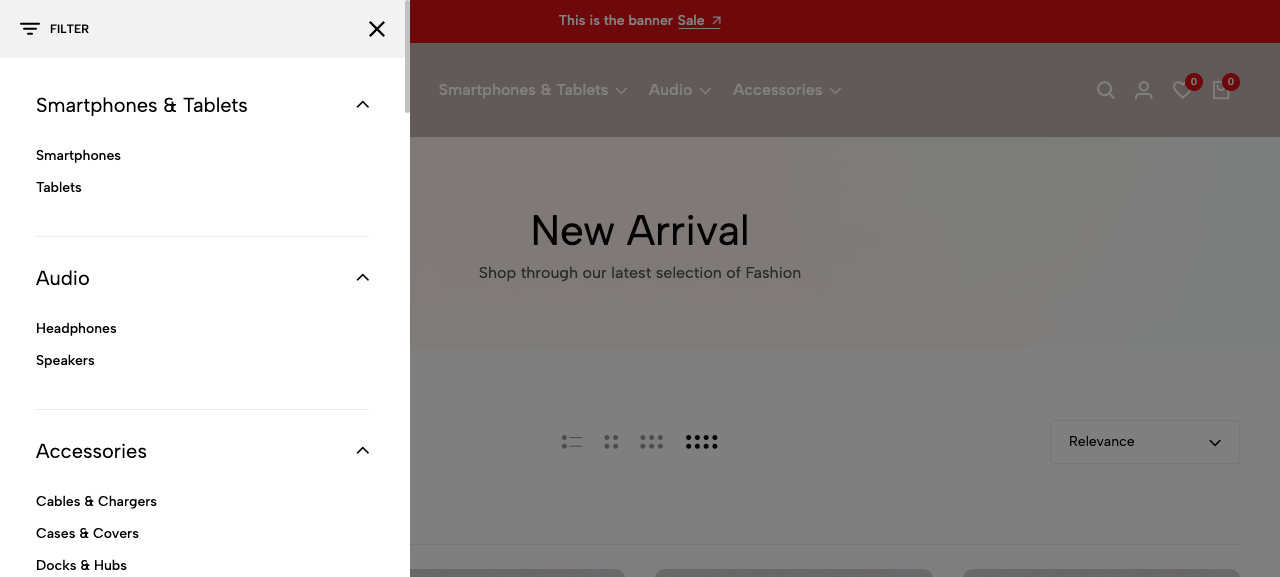
product_detailsnapshot. - A Filter drawer (opened from the listing) provides category navigation: top-level
groups (e.g. Smartphones & Tablets, Audio, Accessories) that each expand to their
subcategories. There are no brand / colour / size / price facets and no facet counts in
this UI; brand filtering is available only as a URL-level capability via query parameters
(e.g.
?brands=).
Notes and limitations
- 4-character floor. FTS only engages at 4+ characters. Shorter queries (1–3 chars) fall
back to a
LIKEsearch rather than FTS ranking — useful results still appear, but they are not relevance-ranked. - Arabic queries use the
LIKEfallback, not FTS. - The index must exist for FTS to work. On a brand-new environment, until the first
build completes (install/migrate backstop, or a manual rebuild), all searches use the
LIKEfallback. A System Manager can trigger a rebuild viarebuild_index(rate-limited 5/hour); a nightly job rebuilds automatically. - Snapshot vs live data. Cards render from the indexed snapshot for speed; live stock and the live display price are overlaid at render time, but other snapshot fields (e.g. brand, item group) reflect the catalogue as of the last index build/sync.
- Caps: at most 15 searchable content fields; result cards enable 3–8 fields with Name/Image/Price always on.
- Orphan rows for documents removed through bulk paths that bypass doc events are pruned by the next full rebuild (which drops the index file first), not by per-document sync.
- The exact relevance ranking (BM25 + title/recency boosts) and the spelling-correction thresholds are implementation details and may be tuned over time; treat the ordering as "best match first" rather than a fixed contract.